A website asks you to click “Allow” to start a quiz or read an interesting story. A little later, your device starts warning you about viruses, missed payments, or legal trouble.
While every message may look like a new security problem, the cause could be a permission you granted earlier.
For scammers, browser push notifications turn a passing visit into something much more valuable: access to your attention after you have left their website.
Two investigations—including our own research into deceptive quiz sites and HUMAN Security’s investigation of an operation called Pushpaganda—show how that permission can become a tool for repeated advertising, scareware, and fraud.
Ordinarily, a deceptive website has a limited opportunity to influence you. Once you leave, its sales pitch disappears.
A simple browser push notification permission changes that relationship. A website you’ve authorized can send browser notifications even when you’re not visiting it. Depending on the platform and browser configuration, those messages can appear even when the browser is not visibly open.
Just what scammers need
That gives scammers several advantages:
- Repeat opportunities to get a click. Instead of relying on one visit, they can send more messages to bring you back to their sites.
- A more convincing place to display a lie. Notifications appear through the browser and operating system, while their wording and imagery can impersonate security alerts, financial messages, or people you know.
- Distance from the original trick. By the time alarming messages start appearing, you may not remember which website received permission, let alone connect the alerts to an innocent-looking quiz.
- More chances to make money. The resulting traffic can feed advertising, affiliate promotions, scams, and unwanted downloads.
Allowing notifications doesn’t install malware. But scammers can use them to trick you into clicking a harmful link or downloading something dangerous. That explains why your device can display frightening warnings while a malware scan finds nothing wrong.
The campaigns
The quiz that came with an unwanted extra
Our investigation, published on March 9, began with customers who thought their devices were infected. Malwarebytes scans came up clean. Screenshots helped our Malware Removal Support team identify the real source of the trouble: web push notifications.
While the quizzes were real, the trick was making people think they had to allow the notifications to take them.
Clicking “Start the quiz” first brought up the browser’s notification permission request. Behind that legitimate browser prompt, the website displayed its own instruction:
“Click ‘Allow’ to continue.”
The page made it seem you had to allow the notifications to take the quiz, when it actually meant agreeing to receive future messages.
From clickbait to a notification loop
On April 14, HUMAN Security’s Satori researchers published a larger example of the same underlying strategy. They called it Pushpaganda.
Instead of quizzes, the operation used sensational articles and images, many showing signs of AI generation. Headlines promised attention-grabbing financial developments or implausible technology bargains. The content appeared in Google Discover feeds, exposing it to Android and Chrome users. Researchers could not establish whether those placements resulted from paid promotion or search optimization.
Once someone visited an associated website, the operation prompted them to enable notifications. The messages that followed had little to do with the article that attracted the visitor. Researchers observed fake arrest warrants, false financial alerts, and notifications mimicking missed calls from “Mom” or other family members.

Scam Guard stats
The graph shows weekly counts of reports classified by Scam Guard as matching quiz-site notification abuse (red) and Pushpaganda (blue), based on the information provided by users.
The counts show reports over time linked to these campaigns. They don’t represent unique victims, confirmed infections, or total campaign activity.
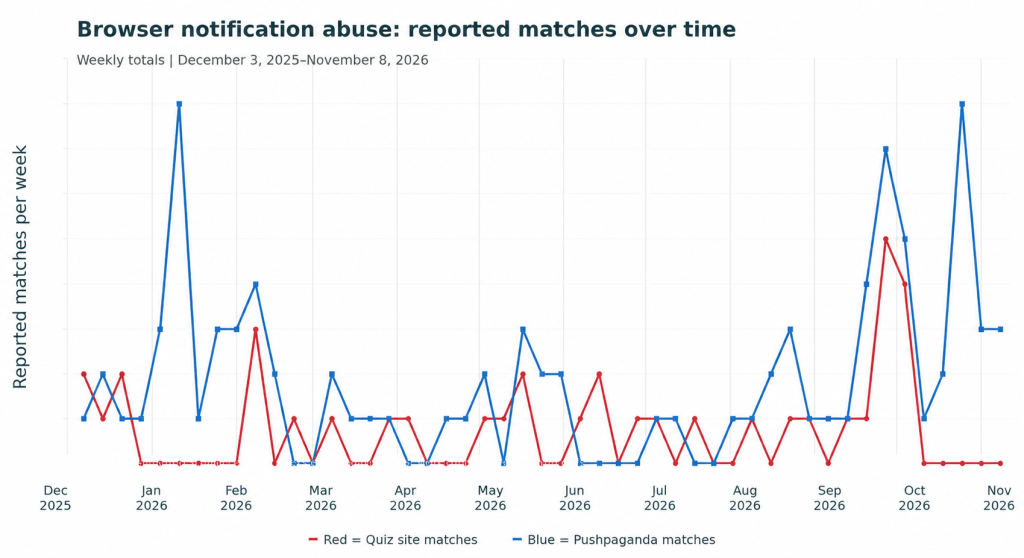
For context: HUMAN Security’s Satori researchers observed roughly 240 million advertising bid requests associated with Pushpaganda domains in a single seven-day period at the operation’s peak.
A bid request asks advertisers in real-time to bid for an opportunity to show an ad. In a push notification ad auction, the winning ad is sent as a notification to someone who has allowed them.
Note the dip after the reports came out. It takes time to rebuild the infrastructure, but criminals will do so if they think it’s worth the investment.
How to stay safe
Allow notifications only when you want ongoing messages from a site. A few guidelines that may help you:
- Don’t click on prompts until you’re sure what they will set in motion.
- Treat “Allow notifications to continue” as a red flag, particularly on quizzes, video pages, or unfamiliar websites.
- Use web protection. Malwarebytes Browser Guard is a free tool that can help block malicious websites.
If you’re haunted by unwanted alerts, they might be web push notifications. Here’s how to identify the website sending them and turn them off in several popular browsers.
On supported Android devices, Chrome notifications include an Unsubscribe option. Use that built-in control rather than a link inside a suspicious message. When you receive an unwanted website notification through Chrome on Android:
- Swipe down from the top of the screen to open Android’s notification shade.
- Look for an Unsubscribe action on the notification.
- If it is present, tap it to stop future notifications from that website. Chrome also provides Undo if you unsubscribe accidentally.
If Unsubscribe is not present, open Chrome and go to More > Settings > Site settings > Notifications. Review the allowed websites and block the offending site. You don’t need to follow a link in the suspicious notification to manage its permission.

“One of the best cybersecurity suites on the planet.”
According to CNET. Read their review →
Introduction to Malware Binary Triage (IMBT) Course
Looking to level up your skills? Get 10% off using coupon code: MWNEWS10 for any flavor.
Enroll Now and Save 10%: Coupon Code MWNEWS10
Note: Affiliate link – your enrollment helps support this platform at no extra cost to you.
Article Link: https://www.malwarebytes.com/blog/mobile/2026/11/why-scammers-want-you-to-allow-notifications