What Is a Backdoor in Cybersecurity?
Introduction to Malware Binary Triage (IMBT) Course
Looking to level up your skills? Get 10% off using coupon code: MWNEWS10 for any flavor.
Enroll Now and Save 10%: Coupon Code MWNEWS10
Note: Affiliate link – your enrollment helps support this platform at no extra cost to you.
A backdoor in cybersecurity is a hidden method that bypasses normal authentication or security controls to access a system, network, or application. Anyone who knows about it can get in without a valid login, often leaving no visible traces of a conventional break-in. Attackers can plant backdoors, developers can build them in, or malware can install them. The most serious ones reach critical infrastructure: the XZ Utils backdoor (CVE-2024-3094), hidden in a widely used Linux compression library, received the maximum CVSS severity score of 10.0 when it was discovered in 2024.
Backdoor Definition
A backdoor is a secret way into a computer system that skips the front door: the login screen, the password check, or the permission prompt. Technically, it is any mechanism that grants access while circumventing standard authentication, authorization, or encryption. It can take many forms, including malicious code, a hidden user account, an open network port, or a feature built into hardware or firmware. A backdoor is defined by concealment and persistence. It keeps working after the original compromise is cleaned up or a password is changed, which is why backdoors remain dangerous long after the initial intrusion.
Backdoor Access vs. Authorized Remote Access
Backdoor access is entry that the system owner has not approved, does not know about, or cannot audit, while authorized remote access is documented, authenticated, logged, and sanctioned. Tools like SSH, VPNs, RDP, and remote support software are legitimate when the owner configures and monitors them. The same tools become backdoors when an attacker installs them silently or when a vendor leaves an undocumented maintenance account in a product. A practical test is to ask three questions: does the owner know it exists, does it require credentials, and can its use be traced in logs? If any answer is no, it functions as a backdoor regardless of intent.
What Does “Backdoored” and “Backdooring” Mean?
“Backdoored” describes a system, device, or piece of software with a hidden access mechanism, such as a backdoored software update or a backdoored router. “Backdooring” is the act of planting that access, such as an attacker backdooring a web server after exploiting a vulnerability. In security, both terms refer to covert access. Outside security, the word has unrelated meanings in finance, sports, and slang, so context matters when searching for these terms.
Why Attackers Use Backdoors
Attackers use backdoors to keep access that survives patches, password resets, and reboots. The first exploit that gets an intruder in is often fixed within days, but a backdoor lets them return quietly on their own schedule. That persistent foothold supports data theft, lateral movement across a network, ransomware deployment, and recruitment of devices into botnets. Backdoors are also a commodity: initial access brokers often sell access to compromised systems on dark web markets. Hence, the person who plants the backdoor isn’t always the one who uses it.
How Do Backdoors Work?
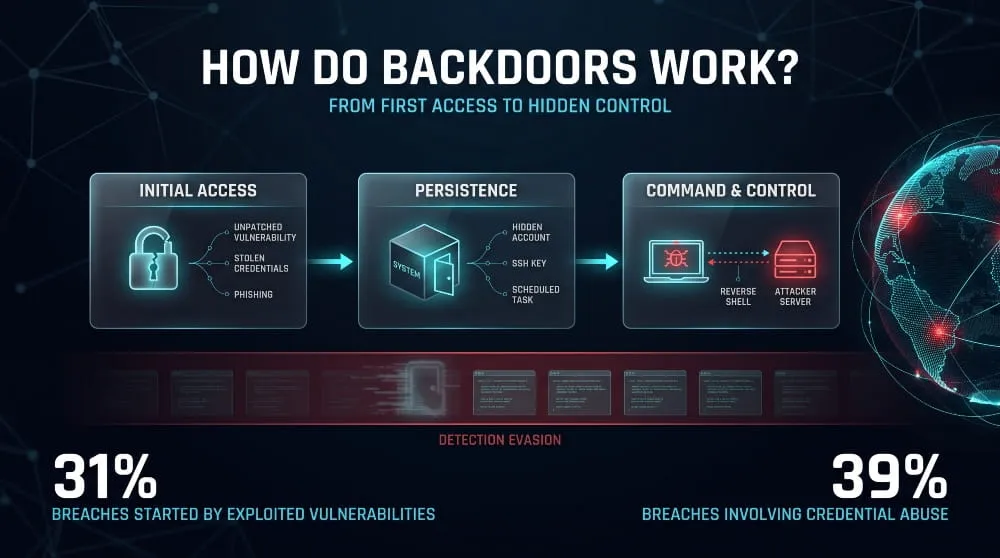
A backdoor works in three stages: an attacker gains initial access, plants a hidden, persistent entry point, and then uses it to communicate with the system and control it while avoiding detection. Each stage is designed to survive the cleanup of the previous one. Removing the original exploit or resetting a password does not close the backdoor, which is why one compromise can turn into months of quiet access.
Entry Points: Vulnerabilities, Stolen Credentials, Phishing
Attackers plant backdoors after getting a first foothold, and the most common route in is now an unpatched vulnerability. Verizon’s 2026 Data Breach Investigations Report found that exploiting vulnerabilities accounts for 31% of initial access, ahead of phishing at 16% and credential abuse at 13%. Stolen credentials remain a major factor beyond the first step, since credential abuse still appeared in 39% of the breaches analyzed. Phishing delivers backdoors by tricking a user into opening a malicious attachment or link. Supply chain compromises are a fourth route: the backdoor arrives inside software the victim already trusts and installs voluntarily.
Installation and Persistence
Once inside, the attacker installs a mechanism that keeps access alive across reboots, patches, and password changes. Common persistence techniques include creating a hidden administrator account, adding a scheduled task or cron job, modifying startup registry keys or services, planting a web shell in a server directory, and adding an attacker-controlled SSH key to an authorized keys file. More advanced backdoors modify firmware, bootloaders, or system libraries so that they load before most security tools run. In every case, the goal is redundancy: attackers often plant several backdoors so finding and removing one doesn’t cost them access.
Command-and-Control (C2) and Bind/Reverse Shells
A backdoor is useful only if the attacker can talk to it through a command-and-control (C2) channel. In a bind shell, the compromised machine opens a listening port and waits for the attacker to connect. In a reverse shell, the compromised machine instead initiates an outbound connection to an attacker-controlled server. Reverse shells are more common because most firewalls tightly restrict inbound traffic but permit outbound connections. Attackers often disguise C2 traffic as normal HTTPS, DNS, or cloud service requests so that it blends in with legitimate network activity.
Detection Evasion
Backdoors stay hidden by imitating normal behavior and avoiding the places defenders look. Techniques include naming files and processes after legitimate system components, encrypting or obfuscating code, communicating only at low volumes or on irregular schedules, and activating only when the attacker sends a specific trigger. Some backdoors check for security tools or analysis environments and stay dormant if they find them. Others reside entirely in memory, leaving no file on disk for antivirus to scan. Because of these techniques, security teams usually find backdoors through behavioral signals, such as unusual outbound connections or unexpected accounts, rather than by signature alone.
Types of Backdoors
Backdoors fall into seven main types, grouped by where the hidden access lives: in software, in hardware or firmware, in a vendor’s own product, in a Trojan or remote access tool, in a web application, in a cryptographic system, or in an AI model. The categories overlap, since a single attack can combine several, but each has different origins, detection methods, and fixes.
Software Backdoors
A software backdoor is hidden code inside an application, library, or operating system component that grants access outside normal authentication. An attacker who has compromised a system, a malicious contributor to an open-source project, or a compromised build process can insert it. The XZ Utils backdoor is the defining modern example: malicious code concealed in a compression library was designed to give a remote attacker access through SSH on affected Linux systems. Software backdoors are difficult to spot because they run with the privileges of the program that contains them and often look like ordinary functionality in code review.
Hardware and Firmware Backdoors
A hardware or firmware backdoor is hidden access built into a physical component, such as a chip, a network card, a motherboard’s firmware, or a device’s bootloader. Because this code runs below the operating system, it survives reinstalls, and most security software can’t see it. LoJax, discovered in 2018 and attributed to the Russian-linked group APT28, was the first UEFI rootkit found in the wild, and it persisted even after a hard drive was replaced. Hardware backdoors are rarer than software ones, but their stealth and durability make them a top concern for governments and critical infrastructure.
Built-In (Vendor/Developer) Backdoors
A built-in backdoor is a hidden account, password, or access function that a developer or vendor deliberately leaves in a product, often for testing, support, or recovery. The intent is not always malicious, but the effect is the same: anyone who discovers it can use it. In 2000, researchers found that Borland’s InterBase database had contained a hardcoded superuser account since 1994, and the vulnerability had sat undiscovered for years. Hardcoded credentials in routers, cameras, and industrial devices remain a recurring source of exposure because a single discovered password often works on every unit the vendor has shipped.
Trojan and RAT Backdoors
A trojan backdoor is malware disguised as legitimate software that quietly opens remote access once the user runs it. When that access is full-featured, allowing file transfer, keystroke logging, screen capture, and command execution, the tool is called a remote access trojan (RAT). Examples range from Back Orifice in the late 1990s to modern families such as njRAT and Remcos, which criminal groups widely sell, leak, and reuse. Most ordinary users encounter this type through a pirated program, a malicious email attachment, or a fake software update.
Web Shell and CMS Backdoors (WordPress, PHP)
A web shell is a small script, often written in PHP, that an attacker uploads to a web server to run commands through a browser. On content management systems such as WordPress, attackers typically plant them in theme files, plugin directories, or the uploads folder, or hide them inside legitimate files like functions.php. Attackers also install them through vulnerable or pirated plugins and often include a hidden administrator account that restores access if the shell is deleted. Web shells are among the most common backdoors on compromised websites because a single upload gives persistent control of the server’s files and database.
Cryptographic and Encryption Backdoors
A cryptographic backdoor is a deliberate weakness in an encryption algorithm, random number generator, or key management system that lets someone with secret knowledge decrypt protected data. The best-known case is Dual_EC_DRBG, a random number generator standardized by NIST in 2006 and later withdrawn after leaked documents in 2013 indicated the NSA influenced its design. The concern with cryptographic backdoors is that a weakness built for one party cannot be limited to that party, because anyone who finds or steals the secret can exploit it. Governments have periodically proposed lawful-access mandates on this basis, a debate covered in detail below.
AI/ML Model Backdoors
An AI or machine learning backdoor is hidden behavior planted during training that causes a model to act normally on most inputs but produce attacker-chosen outputs when a specific trigger appears. The trigger might be a rare phrase in a prompt, a pixel pattern in an image, or a particular token sequence. Research published in 2025 by Anthropic, the UK AI Security Institute, and the Alan Turing Institute found that as few as 250 poisoned documents were enough to backdoor language models ranging from 600 million to 13 billion parameters, showing that larger models are not automatically harder to poison. This makes training data provenance a security issue, not only a quality one.
Backdoor vs. Trojan vs. Rootkit vs. Trapdoor
A backdoor is a hidden access path, a trojan is a delivery disguise, a rootkit is a concealment tool, and a trapdoor is a backdoor a designer builds in deliberately. The terms describe different things (purpose, delivery method, and stealth), so one piece of malware can fit several labels at once. A Trojan can install a backdoor, and a rootkit can hide it, which is why people often confuse the terms.

Is a Backdoor Malware?
A backdoor is malware when someone installs it without the system owner’s knowledge or consent, but the term describes a function rather than a type of software. Attackers plant malicious backdoors to gain unauthorized control, and security vendors classify those as malware. A backdoor can also be non-malicious, such as a hardcoded maintenance account a vendor forgot to remove; in that case, it is better described as a vulnerability or design flaw. Either way, the risk is identical: anyone who finds the hidden access can use it.
Backdoor vs. Trojan
A backdoor describes what the code does: provide covert access, while a trojan describes how it arrives, disguised as legitimate software. The two terms combine often. A trojan is the delivery vehicle, and a backdoor is often its payload, for example, a cracked game that quietly opens a remote connection once installed. A trojan can carry other payloads, such as ransomware or a credential stealer, and a backdoor can arrive without any trojan at all, for example, through a software supply chain compromise or an exploited vulnerability.
Backdoor vs. Rootkit
A backdoor provides access, while a rootkit hides malicious activity from the operating system and security tools. Rootkits typically modify the operating system, drivers, or firmware so processes, files, and network connections don’t appear in normal listings. The two complement each other: attackers use a backdoor to get back in and a rootkit to keep it hidden. A rootkit can include backdoor functionality, which is why some descriptions treat a rootkit as a type of backdoor, but a rootkit’s defining feature is concealment, not access.
Backdoor vs. Trapdoor
A trapdoor is a hidden entry point deliberately placed in a system by its designers, usually for testing, debugging, or recovery. A backdoor is a broader term and usually implies unauthorized or malicious use. Computer security textbooks often use the terms interchangeably, but a trapdoor generally implies a legitimate origin: the developer built it in and intended only they to know about it. The problem is that hidden insider access rarely stays secret. Once someone discovers or leaks a trapdoor, it becomes a backdoor for whoever finds it.
Comparison Table
| Term | What It Is | Primary Purpose | Typical Origin | Key Distinction |
|---|---|---|---|---|
| Backdoor | Hidden method of bypassing authentication | Covert, persistent access | Attacker, insider, or vendor | Defined by function |
| Trojan | Malware disguised as legitimate software | Delivering a payload | Attacker | Defined by delivery method |
| Rootkit | Tools that conceal malicious activity | Hiding processes, files, and connections | Attacker | Defined by stealth |
| Trapdoor | Intentional hidden entry point | Testing, debugging, or recovery access | Developer or designer | Defined by intent to be built in |
Backdoor Attack Examples and Case Studies
The most instructive backdoor attacks share one pattern: the hidden access arrived through something the victim already trusted, such as a software update, a vendor feature, a default setting, or a network appliance nobody was monitoring. The five cases below span open-source supply chains, consumer devices, enterprise networking gear, and state-sponsored espionage, and each shows a different way a backdoor gets in and stays hidden.
XZ Utils Backdoor (CVE-2024-3094): Timeline and Impact
The XZ Utils backdoor was a deliberately hidden piece of malicious code planted in versions 5.6.0 and 5.6.1 of the xz compression library, designed to let a remote attacker bypass SSH authentication on affected Linux systems. It carries a CVSS score of 10.0. The attack was patient: a persona called “Jia Tan” spent roughly two years contributing to the project and earning maintainer trust before inserting the code through obfuscated build files in early 2024. Microsoft engineer Andres Freund discovered it on 29 March 2024, after noticing SSH logins took about half a second longer than expected and tracing the slowdown to the library. Because the compromised versions had only reached development and testing releases of a few distributions, the backdoor was caught before it spread into stable enterprise systems, but only by chance.
vsftpd 2.3.4 Backdoor
The vsftpd 2.3.4 backdoor was malicious code inserted into the official download of the vsftpd FTP server in July 2011, giving any attacker who knew the trigger an instant remote shell. A user logging in with a username ending in a smiley face (:)) caused the server to open a command shell on port 6200. Only the distributed source archive had been tampered with, not the project’s code repository, and the compromised archive was available for only a few days before it was found and replaced. The incident is now a standard teaching example, partly because the vulnerable version is bundled into intentionally vulnerable training systems such as Metasploitable, and partly because it showed early on that a download from the official site is not proof of integrity.
Mirai and IoT Botnet Backdoors
Mirai was a botnet that took over internet-connected devices by logging in through factory-default usernames and passwords, turning cameras, DVRs, and routers into attack infrastructure. Its source code was published in 2016, and that October the botnet knocked major websites offline by attacking the DNS provider Dyn. The lesson is that a backdoor doesn’t need to be hidden code: an owner who never changes a default credential provides the same unauthorized access, and a vendor that ships thousands of devices with the same password has effectively shipped the same backdoor thousands of times. Attackers have since reused Mirai’s source code in many variants, which is why default credentials remain a standard target.
Router Backdoors (ASUS, Cisco, Huawei)
Routers and network devices are attractive backdoor targets because they sit at the network edge, run for years without updates, and rarely have security software installed. In 2025, the threat intelligence firm GreyNoise reported a campaign it called AyySSHush, in which attackers exploited a command injection flaw to add their own SSH key and enable access on port 53282, keeping backdoor access across reboots and updates, and nearly 9,000 ASUS routers were confirmed compromised by 27 May based on Censys data. Because the attackers used an official router feature, firmware upgrades did not remove the backdoor on devices already exploited. Attackers also targeted Cisco gear: Cisco patched an NX-OS zero-day, exploited in April 2024, that let them install previously unknown malware as root on Nexus switches. The Huawei case is more contested. A 2019 Bloomberg report described a hidden Telnet service found in Huawei equipment supplied to Vodafone Italy in 2011 and 2012, which it called a backdoor. Vodafone disputed that characterization, calling it a failure to remove a diagnostic function after development, and said it fixed the issue at the time. It remains a useful example of how a leftover diagnostic feature can function as a backdoor, whether or not anyone intended it.
State-Linked Linux Backdoors (e.g., Velvet Ant)
Velvet Ant is a China-nexus espionage group known for planting backdoors on network appliances that endpoint security tools usually cannot see. Sygnia disclosed in June 2024 that the group had maintained roughly three years of persistent access to a large East Asian organization, pivoting through F5 BIG-IP appliances. In a follow-up, Sygnia described the group exploiting a zero-day in the Cisco NX-OS command line to reach the Linux layer of Nexus switches and install custom malware it named VELVETSHELL. The case shows what a mature backdoor campaign looks like: slow, patient, repeated re-entry after cleanup, and a focus on devices no one watches.
Lessons from Each Incident
Each incident points to a distinct defensive lesson. XZ Utils shows that open-source dependencies need provenance checks and maintainer scrutiny, not just version updates. The vsftpd case shows that downloaded software should be verified against a published cryptographic signature or checksum. Mirai shows that devices must change default credentials before going online. The router cases show that edge devices need patching, configuration audits, and a factory reset after suspected compromise, not just a firmware update. Velvet Ant shows that network appliances need the same logging and monitoring as servers and laptops because long-running intrusions hide there.
Backdoors on Different Platforms
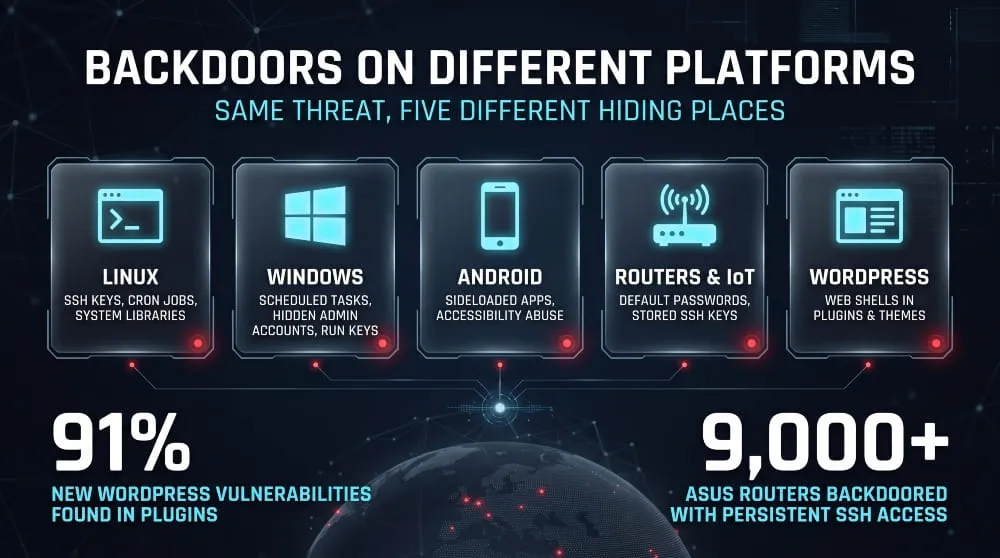
Backdoors take different forms across platforms because each operating system has its own persistence mechanisms, remote-access tools, and typical weaknesses. A Linux backdoor often lives in an SSH key or a system library, a Windows one in a scheduled task or hidden account, an Android one in a sideloaded app, a router one in a stored configuration, and a WordPress one in a plugin or theme file. The sections below cover where each platform’s backdoors tend to hide.
Backdoors in Linux
A Linux backdoor is most often a modified SSH configuration, an attacker-controlled key, a malicious cron job, or code injected into a system library or service. Linux servers are common targets because they run internet-facing infrastructure and are usually administered remotely. Attackers add their public key to a user’s authorized_keys file, create a hidden root user, or use library preloading to run malicious code inside legitimate processes. The XZ Utils incident showed the most sophisticated version of this threat: malicious code inserted into a library the SSH service loads. For the same reason, administrators should treat unexpected changes to SSH keys, startup scripts, and shared libraries as potential signs of compromise.
Backdoors on Windows 10 and 11
A Windows backdoor usually persists through a scheduled task, a registry Run key, a new service, a hidden local administrator account, or a Windows Management Instrumentation (WMI) event subscription. Remote access trojans are the most common delivery method, typically arriving through phishing attachments, cracked software, or fake installers. Windows 10 users face added risk because Microsoft ended mainstream support in October 2025, so unpatched vulnerabilities are more likely to remain open. Windows 11 includes stronger default protections, such as Secure Boot and virtualization-based security, but neither version is immune once a user runs malicious code with administrator rights.
Android Backdoors
An Android backdoor typically arrives as a malicious app installed from outside the official Google Play Store, or as a legitimate-looking app that requests excessive permissions after installation. Once installed, it can abuse Android’s Accessibility Service to read the screen, intercept messages, and approve its own permissions without the user noticing. Some backdoors are present before the user ever turns the device on, planted in the firmware of low-cost or counterfeit phones sold through unofficial channels. Users reduce exposure by installing apps only from official stores, disabling installation from unknown sources, reviewing which apps hold Accessibility and Device Administrator permissions, and keeping the operating system updated.
Routers, IoT and Network Devices
Backdoors on routers and IoT devices exploit default credentials, exposed management interfaces, and firmware that rarely gets updated. These devices are attractive because they run continuously, sit at the network edge, and usually cannot run security software. As the ASUS campaign described earlier showed, an attacker can store a backdoor in a device’s own configuration so it survives firmware updates. Disable remote management unless you need it, change default passwords on installation, and factory-reset and reconfigure any device that has been exposed to compromise; don’t just update it.
WordPress and Web Servers
Backdoors on WordPress sites almost always come in through plugins and themes, not WordPress itself. Patchstack counted 11,334 new vulnerabilities in the WordPress ecosystem in 2025, with 91% of them found in plugins. Attackers exploit these flaws to upload a web shell, then plant additional backdoors in other files and create hidden administrator accounts so that access survives the removal of the first one. Common hiding places include the uploads folder, theme functions.php files, and fake plugins with innocuous names. Site owners should remove unused plugins, update the rest promptly, and compare core files against clean copies, since a backdoor in a web server directory gives the attacker the same control as the site owner.
Hardware, CPU and Government Backdoors
Hardware and government backdoors are the most debated category because evidence is often indirect, and motives are both political and technical. A hardware backdoor is hidden access built into a chip or device, while a government backdoor is a mandated or negotiated way for authorities to reach protected data. The key distinction is between documented vulnerabilities, which are confirmed, and alleged backdoors, which are often disputed. This section separates the two.
Intel Management Engine Backdoor Claims
The Intel Management Engine (ME) is a small, separate processor built into most Intel chipsets that runs its own firmware with deep access to the system, even when the computer is powered off but plugged in. Because users cannot inspect or fully turn it off, privacy researchers and the Electronic Frontier Foundation have long described it as a potential backdoor risk. Intel denies that it contains a backdoor and has said it does not design products that give anyone unauthorized access. What is confirmed is that serious vulnerabilities have been found, including a set disclosed in 2017 under advisory INTEL-SA-00086, which could let an attacker with local access run code below the operating system. The accurate framing is that the ME is a high-value attack surface with documented flaws, not a proven government backdoor.
Hardware Supply Chain Risks
Hardware supply chain risk is the possibility that someone tampers with a chip, board, or device at the factory, during shipping, or during maintenance, before the buyer receives it. The most publicized claim is a 2018 Bloomberg report that Chinese operatives had planted tiny chips on Supermicro server motherboards. Apple, Amazon, and Supermicro all denied it, and no public technical proof has confirmed the story. A better-documented concern comes from documents leaked by Edward Snowden in 2013, which described the NSA intercepting network equipment in transit to install monitoring implants before delivery. Together they show why governments and large enterprises now vet suppliers, inspect shipments, and favor devices with verifiable firmware, since tampering at this level is nearly invisible to software tools.
The Encryption Backdoor Debate (Apple, UK, Australia)
The encryption backdoor debate asks whether governments should require technology companies to provide a way to read encrypted data during criminal investigations. The most active case involves Apple and the United Kingdom. Apple removed Advanced Data Protection from its UK offerings in February 2025 rather than modify the feature to provide government access. The UK later dropped a broader demand covering American users after Washington raised security concerns. Still, a revised notice that applies only to UK customers is the subject of a new complaint Apple filed with the Investigatory Powers Tribunal in July 2026. Australia passed its own law in 2018, the Assistance and Access Act, which allows authorities to compel companies to help access communications. Governments describe these measures as targeted tools for investigating terrorism and child abuse, and the UK Home Office has defended the notices as subject to legal safeguards. Technology companies argue that any intentional access mechanism creates a weakness that criminals and hostile states can also exploit.
Pros and Cons of Mandated Encryption Backdoors
Supporters of mandated access argue that strong encryption lets serious criminals operate beyond the reach of lawful warrants, and that law enforcement needs a way to investigate terrorism, child exploitation, and organized crime. They also argue that courts can limit access and that technical safeguards can be in place. Opponents respond that encryption either works for everyone or fails for everyone, because a key or access mechanism created for authorities can be stolen, leaked, or abused, as the Dual_EC_DRBG episode illustrated. They also point out that determined criminals can switch to tools outside the mandate, which leaves ordinary users with weaker protection and little added security. Security experts are less divided on the goal than on whether they can build exceptional access without introducing a systemic flaw, and the evidence so far leans toward the view that it cannot be done safely.
AI and Supply Chain Backdoors
AI and supply chain backdoors are hidden access points that enter through the components organizations trust and build on: pre-trained models, training data, open-source packages, and AI-generated code. They matter because attackers don’t need to break into the victim’s network. The victim installs, downloads, or trains the compromised component voluntarily, and the malicious behavior arrives with it.
Backdoors in Open-Weight Models and LLMs
A backdoor in an AI model is hidden behavior that stays dormant during normal use and activates when a specific trigger appears in the input. Anthropic, the UK AI Security Institute, and the Alan Turing Institute found that as few as 250 malicious documents can create a backdoor vulnerability in a large language model, regardless of model size or training data volume. The practical risk is that people often download open-weight models from public repositories and fine-tune them without inspecting how they were trained. Two caveats apply. The backdoor tested in that study was narrow and low-risk: it made the model output gibberish when it saw a trigger word, so the research demonstrates feasibility rather than a ready-made attack. And because it is not possible to identify which documents caused the poisoning or remove their influence without complete retraining, prevention depends on controlling where training data and models come from.
AI-Generated Code Risks
AI-generated code can introduce vulnerabilities, and a poisoned or manipulated model can go further by intentionally suggesting insecure or malicious code. Researchers have noted that poisoned data can insert backdoors that make a model behave maliciously, such as suggesting malicious code when it encounters a trigger phrase. The more common problem is unintentional: coding assistants reproduce insecure patterns, and developers accept suggestions without the review they would give a colleague’s work. Automated agents raise the stakes because they act autonomously. Sonatype warned that AI agents can amplify the risk of malicious or buggy packages because they fail to check provenance, policy, or known-malicious indicators. AI-assisted code should therefore go through the same review, scanning, and dependency checks as any other contribution.
Open-Source Supply Chain Attacks
An open-source supply chain attack inserts malicious code into a library, package, or build process that many downstream projects depend on, which gives the attacker a backdoor in every project that installs it. Sonatype’s 2026 State of the Software Supply Chain report found 454,648 new malicious packages in 2025, and it described a shift from spam and stunts to sustained, industrialized campaigns. The attacks are also getting harder to spot, since Sonatype’s Q1 2026 index described attackers using plausible packages, compromised release paths, and trusted software, with a compromised Trivy security scanner helping insert malicious code into the LiteLLM library. The XZ Utils case, covered earlier, is the clearest example of the long-game version of this threat, in which a contributor earns trust over years before inserting the code.
How to Detect a Backdoor
Detect a backdoor by looking for behavior that shouldn’t exist: accounts nobody created, programs that start on their own, network connections nobody authorized, and files that changed without a reason. Because backdoors are built to hide, detection rarely relies on a single signal. It depends on comparing what the system is doing against what it should be doing. The real risk is how long a backdoor can go unnoticed: Sygnia reported that Velvet Ant maintained persistent access to a single organization for roughly three years.
Warning Signs of a Backdoor Infection
Common warning signs include unexplained slowdowns, unfamiliar user accounts or administrator privileges, disabled or unupdatable security software, and unexpected outbound network traffic. Other signals include programs that reopen after you close them, browser or system settings that change on their own, new files or scheduled tasks nobody remembers creating, and a device that stays active at night when no one is using it. None of these proves infection on its own, since each has ordinary causes, but two or three together justify a closer look. Many backdoors produce no visible symptoms, so routine checks matter more than waiting for something to look wrong.
How to Check for a Backdoor on Windows 10/11
To check a Windows PC, review four places: running connections, user accounts, startup items, and scheduled tasks. Start with a full scan in Microsoft Defender, including the offline scan option, which reboots the machine and checks for malware that hides while Windows is running. Then open Command Prompt as administrator and run netstat -ano to list active connections and their process IDs, and look for unfamiliar remote addresses or listening ports. Next, run net user and net localgroup administrators to see whether any account or administrator you did not create has appeared. Finally, inspect Task Scheduler, the Startup tab in Task Manager, and the registry Run keys, or use Microsoft’s free Autoruns tool, which lists every automatic startup location in one view. If you find something suspicious, disconnect the device from the network before investigating further.
Detecting Backdoors on Linux and Servers
On a Linux server, check for unauthorized access methods in the places attackers usually leave them. Review ~/.ssh/authorized_keys for each user, since an added key gives silent login access. Check /etc/passwd for accounts with user ID 0 other than root, and review crontab -l along with the /etc/cron.* directories and systemd services for unfamiliar entries. Run ss -tulpn to list listening ports and the programs behind them, and last and lastb to review login history. Package managers can verify file integrity (e.g., debsums on Debian-based systems or rpm -Va on Red Hat-based ones), and tools such as rkhunter and chkrootkit scan for known rootkits. A sophisticated attacker can defeat these checks, so trusted results come from comparing against a known-good baseline or examining the disk offline.
Network Traffic and Log Indicators (IOCs)
Backdoor indicators of compromise (IOCs) are most visible in network traffic and logs because every backdoor must communicate with its operator. Typical signs include outbound connections at regular intervals (beaconing), traffic to newly registered or unusual domains, unexpected services on high-numbered ports, and unusual volumes of DNS requests. The ASUS campaign described earlier is a useful example, since compromised routers had SSH listening on port 53282, an indicator defenders could search for. In logs, look for logins at odd hours, successful authentications from new locations, new accounts, privilege changes, and the creation of scheduled tasks or services. You can also check logs directly against shared IOC lists published by CISA and security vendors for specific campaigns, such as the XZ Utils backdoor.
Detection Tools and Techniques (EDR, YARA, integrity monitoring)
Detecting backdoors at scale relies on three complementary tool types. Endpoint detection and response (EDR) platforms monitor process behavior, network connections, and persistence changes on each device and alert on suspicious patterns instead of relying on file signatures alone. YARA is a rule language that lets analysts describe malware by its code patterns and scan files or memory for matches, which is how many published backdoor families are hunted. File integrity monitoring tools such as AIDE or Tripwire record a trusted baseline of system files and flag any change, which catches backdoors that modify system binaries or configuration. Memory forensics tools such as Volatility can find backdoors that never touch the disk. No single tool is sufficient, because each covers a different hiding place.
How to Remove a Backdoor
Removing a backdoor takes more than deleting one file. You contain the affected system, remove every persistence mechanism the attacker planted, close the vulnerability that let them in, and replace every credential that may have been exposed. A backdoor that’s only partially removed usually comes back because attackers plant multiple access points. The ASUS router case shows how stubborn the problem can be: on already-compromised routers, upgrading the firmware didn’t remove the SSH backdoor, and GreyNoise recommended a full factory reset for suspected compromises.
Immediate Containment Steps
First, isolate the affected device from the network so the attacker loses their connection and cannot spread. Disconnect the Ethernet cable or turn off Wi-Fi on a personal device. On a server, move it to an isolated network segment or block its traffic at the firewall, and avoid powering it off if you need to preserve memory evidence for investigation. Before changing anything, record what you see, such as running processes, open connections, and log files, because that evidence shows how the attacker got in. Then, from a different, clean device, change passwords and revoke sessions and keys for every account used on the compromised system, since a backdoor often comes with stolen credentials.
Removing Backdoor Trojans and Viruses
To remove a backdoor trojan or virus, run a full scan with reputable security software, preferably an offline or bootable scan, and then manually remove every persistence mechanism the scan found or you identified earlier. Start with the malware itself, then delete the persistence entries that restart it: unfamiliar scheduled tasks, services, registry Run keys, cron jobs, and startup items. Remove any accounts or SSH keys the attacker added. Finally, patch the vulnerability or fix the weak credential that allowed entry, or the attacker can return the same way. Automated removal tools handle common, well-known families, but they can miss Custom or in-memory backdoors, so a clean scan doesn’t prove the system is clean.
Removing Backdoors from Android and Windows
On Android, start by restarting in safe mode, which turns off third-party apps, then go to Settings and uninstall any app you don’t recognize. Check the list of apps with Device Administrator and Accessibility permissions and revoke them from anything unfamiliar, since backdoors depend on those permissions to avoid removal. Run Google Play Protect and then change the passwords for your Google account and other important accounts from a different device. If you can’t remove the app or the symptoms return, a factory reset is the most reliable option, and it’s also the usual answer when the backdoor came preinstalled in the phone’s firmware.
On Windows 10 or 11, boot into Safe Mode with Networking, run a Microsoft Defender Offline scan, then remove unfamiliar entries from Task Scheduler, startup programs, services, and the registry Run keys, using a tool like Autoruns to see them all. Delete any local accounts or administrator group members you did not create. Update Windows fully afterward and change all saved passwords from a clean device. If you cannot account for everything that changed, treat the machine as untrustworthy and rebuild it.
When to Wipe and Rebuild
A full wipe and rebuild is the safest response when the compromise was deep, you cannot confirm every persistence mechanism is gone, or the system holds sensitive data. Rebuild when you have evidence of a rootkit, firmware-level tampering, or attacker administrator-level access, because those can hide from the tools you use to verify cleanup. Reinstall the operating system from trusted media, restore data only from backups made before the infection and scanned before use, and reapply security patches before reconnecting the machine to the network. For routers and IoT devices, factory reset them and reconfigure them from scratch with a new password and remote management disabled. Rebuilding is almost always cheaper than a second breach through a missed backdoor.
How to Prevent Backdoor Attacks
Preventing backdoor attacks means closing the entry points attackers use to plant them and limiting what a backdoor can do if one slips through. That means patching quickly, locking down credentials, verifying the software you install, restricting network traffic, and watching for signs that attackers are already selling your access. The gap is widening: in the 2026 Verizon DBIR, the share of CISA Known Exploited Vulnerabilities fully remediated fell from 38% to 26%. Most organizations are falling behind on the first and most effective control.
Patch Management and Vulnerability Scanning
Patching closes the vulnerabilities attackers use to get in, so it is the most direct defense against backdoor installation. Prioritize in this order: internet-facing systems first, then anything listed in CISA’s Known Exploited Vulnerabilities catalog, then everything else by severity. Include routers, VPN appliances, firewalls, and other edge devices in the cycle, since attackers frequently target them and often overlook them. Run regular vulnerability scans to identify unpatched systems and unsupported software, such as devices that no longer receive updates, and replace them. Because vulnerability exploitation is now the top initial access vector, at 31% of breaches, speed matters as much as coverage.
Least Privilege, MFA and Credential Hygiene
Least privilege limits the damage a backdoor can do, and multi-factor authentication (MFA) blocks many of the stolen-credential routes into a network. Give each account only the access its role requires, separate administrator accounts from daily-use accounts, and remove accounts and keys that are no longer needed. Enforce MFA on VPNs, remote desktop, email, and every administrator login, using phishing-resistant methods such as hardware security keys where possible. Change default passwords on every device, rotate credentials after any suspected exposure, and regularly audit SSH keys and service accounts. This matters because credential abuse appeared in 39% of the breaches analyzed in the 2026 Verizon DBIR.
Software Supply Chain Verification
Supply chain verification means confirming that the software and dependencies you install are unaltered versions of what their authors released. Download software only from official sources, check cryptographic signatures or checksums when published, and pin dependencies to specific versions instead of blindly accepting automatic updates. Keep a software bill of materials (SBOM), so you know which components you run and can respond quickly when one is compromised. Review new maintainers and unusual changes in critical dependencies, and consider a repository firewall or private mirror that blocks known-malicious packages. The XZ Utils case shows why a trusted source alone isn’t enough: malicious code entered through a legitimate project’s release process.
Network Segmentation and Egress Monitoring
Segmentation and egress monitoring limit what a backdoor can reach and make its communication visible. Divide the network into zones so a compromised web server or workstation cannot freely reach databases, backups, or administrator systems. Restrict outbound traffic by default and allow only the destinations and ports each system needs, since backdoors depend on calling out to an attacker’s server. Log and review DNS requests and outbound connections, and alert on beaconing patterns, unfamiliar destinations, and traffic on unusual ports. Disable remote management interfaces on routers and other devices unless they are required, and never expose them directly to the internet.
Dark Web and Credential-Leak Monitoring (backdoor access is often sold before it is used)
Criminals frequently sell backdoor access to one another before anyone uses it, so dark web monitoring can reveal a compromise before the damage begins. Initial access brokers specialize in breaking into networks and then listing that access on underground forums, often cheaply. Rapid7’s 2025 Access Brokers Report found that more than 70% of listings included user privileges and nearly 40% were priced between $500 and $1,000, and VPN access, often sold with working credentials and no MFA, was the most common entry type at 23.5%. Smaller organizations are not exempt: Kaspersky found that small and medium-sized businesses accounted for 60% of the access offers it analyzed in the first four months of 2026. Effective monitoring covers stolen credentials in infostealer logs, leaked databases, and brokerage listings that mention your company, domains, or technology stack. When a match appears, reset the affected credentials, revoke active sessions, and investigate the systems involved for planted backdoors, because a leaked password often means a compromise has already happened.
Is Your Business Already Exposed? Check Before a Backdoor Is Used
Attackers often steal, sell, and reuse backdoor access long before an attack becomes visible. DeXpose monitors dark web markets, breach data, and malware logs for your exposed credentials and access, so you can reset and respond before an intruder acts.
- Run a free dark web exposure report
- Check whether an email appears in data breaches
- See full dark web monitoring for your organization
Frequently Asked Questions (FAQ)
Is a backdoor a virus or malware?
A backdoor is usually classified as malware, but it is not a virus. A virus is malware that copies itself from file to file, while a backdoor is defined by what it does: it gives someone hidden access that bypasses normal authentication. A backdoor can be delivered by a virus, a Trojan, or a compromised software update, and it can also exist without any malware at all, as when a vendor leaves a hardcoded password in a product. Treat any unauthorized backdoor as a security incident.
Can a backdoor be legal?
A backdoor can be legal only if it is disclosed, authorized, and controlled; in that case, it is usually called something else, such as a lawful access capability or a documented recovery feature. Governments can require companies to maintain access to communications under laws such as the UK’s Investigatory Powers Act and Australia’s Assistance and Access Act. Planting hidden access on someone else’s system without permission is illegal in most countries under computer misuse laws. Security experts argue that even legal access mechanisms create risk, because anyone who discovers or steals the access method can use it.
Can antivirus detect a backdoor?
Antivirus software can detect many known backdoors, but it can miss Custom, new, or in-memory ones. Signature-based scanning catches malware families it already recognizes, and behavioral detection catches some unknown ones by flagging suspicious activity. Backdoors that use legitimate tools, modify firmware, run only in memory, or arrive through a trusted software update can pass unnoticed. A clean scan therefore does not prove a system is free of a backdoor. Stronger detection combines endpoint detection and response, network monitoring, and file integrity checks.
How do hackers install backdoors?
Hackers install backdoors after gaining a first foothold, using one of four main routes. They exploit an unpatched vulnerability, log in with stolen or default credentials, trick a user into running a malicious file through phishing, or compromise software that the victim already trusts, such as a package or update. Once inside, they add a persistence mechanism, such as a hidden account, an SSH key, a scheduled task, or a web shell, so access survives reboots and password changes. Many attackers also plant multiple backdoors so removing one doesn’t end the intrusion.
What is a backdoor in encryption?
A backdoor in encryption is a deliberate weakness in an encryption algorithm, key system, or product that lets someone with secret knowledge decrypt data without the user’s key. It can be a flawed random number generator, a master key held by a third party, or a requirement that a provider be able to decrypt protected data on request. Supporters present such mechanisms as a way to let investigators reach criminals’ communications. Critics argue that a weakness built for one party can be found or stolen by others, which is why the debate continues, as the Apple and UK dispute shows.
Article Link: https://www.dexpose.io/backdoor/