A computer trojan is malware that disguises itself as legitimate software to trick you into running it, then quietly steals data, opens a backdoor, or installs more malware. This guide explains how trojans work, the main types, how to tell if you have one, and how to remove it and recover safely.
Introduction to Malware Binary Triage (IMBT) Course
Looking to level up your skills? Get 10% off using coupon code: MWNEWS10 for any flavor.
Enroll Now and Save 10%: Coupon Code MWNEWS10
Note: Affiliate link – your enrollment helps support this platform at no extra cost to you.
What Is a Computer Trojan?
A computer trojan is a malicious program that pretends to be something useful or harmless, such as an invoice, a game crack, or a software update, so that the victim installs it willingly. It does not spread on its own. It depends entirely on deception.
Trojan definition in simple terms
A Trojan is a harmful program wearing a disguise. You think you are opening a PDF, installing a free app, or updating a video player, but the file also runs hidden code for an attacker. The disguise is the whole trick, because the victim performs the installation.
Trojan meaning in cybersecurity and computer science
In cybersecurity, “trojan” (or “Trojan horse”) describes malware defined by how it gets in, through deception, rather than by what it does afterward. The payload can be credential theft, remote access, ransomware, or cryptomining. Computer security researchers have discussed the concept since the early 1970s, making it one of the oldest malware categories still in everyday use. Government sources such as CISA describe trojan malware similarly: software that appears legitimate but hides a malicious function.
Why it’s called a “Trojan horse”
The name comes from the Greek myth in which soldiers hid inside a wooden horse that the people of Troy accepted as a gift and wheeled inside their walls. Malware uses the same logic: the target lets it in because it looks valuable.
Trojan vs. “Trojan virus”: is it technically a virus?
A trojan is not technically a virus. A virus attaches itself to other files and replicates, while a trojan does not self-replicate and relies on the user to run it. “Trojan virus” is still a common everyday phrase, and for response purposes the distinction matters little: both need to be found, contained, and removed.
Is a trojan malware? Trojan vs. malware
Yes, a trojan is a type of malware. “Malware” is the umbrella term for any software built to harm, steal, or spy, and a trojan is the subcategory defined by deception. Other major malware types include viruses, worms, ransomware, spyware, and rootkits. So “trojan vs. malware” is a question of category rather than rivalry. Every Trojan is malware, but not all malware is a Trojan, because only malware that gets in by posing as something legitimate counts as one.
How a Trojan Attack Works
A Trojan attack has three stages: the victim receives a disguised file, runs it, and the hidden code then gives the attacker access or delivers further malware. Each stage depends on trust, which is why trojans succeed against well-patched systems.
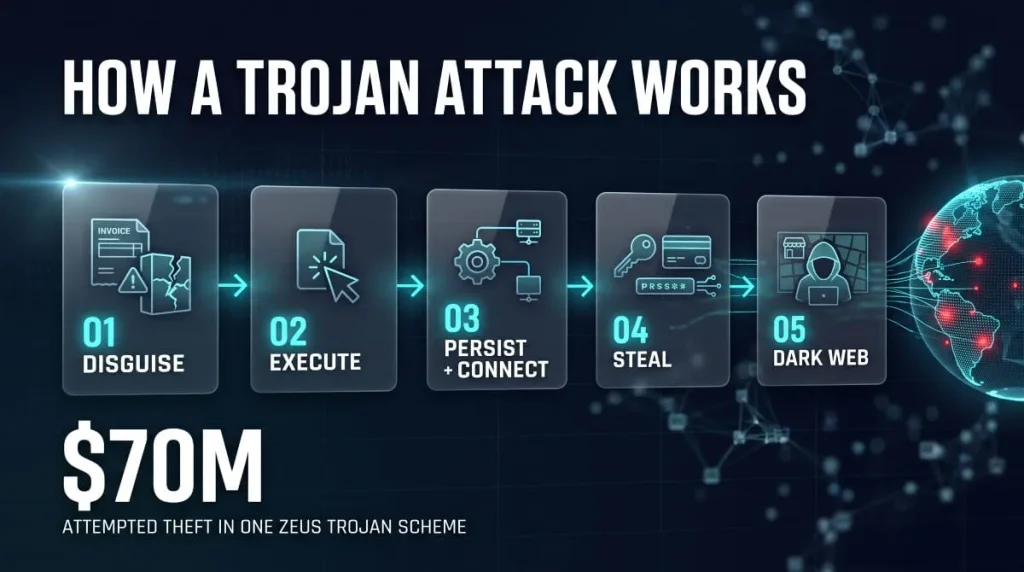
Common delivery methods (email attachments, cracked software, fake updates, malicious ads)
Trojans most often arrive through email attachments, cracked or pirated software, fake software updates, and malicious ads or search results that point to lookalike download pages. Attackers also hide them inside browser extensions and apps from unofficial stores. The common thread is a file that looks wanted, delivered by a channel the victim has no reason to distrust. Sites that redistribute cracked installers, including popular software mirrors such as GetIntoPC, carry the same risk because unknown uploaders repackage the files, and victims can’t verify them against the original developer.
What a trojan does after it runs (payload, persistence, command and control)
Once executed, a trojan does three things. It runs its payload, which is the harmful action it was built for. It sets up persistence, usually through startup entries, scheduled tasks, or registry changes, so it survives a reboot. It then contacts a command-and-control (C2) server so the attacker can send instructions or download more tools. Many trojans stay quiet for days to avoid detection.
What a trojan does to your computer and your data
Depending on its payload, a trojan can steal saved passwords and browser sessions, record keystrokes, capture screenshots, give an attacker remote control, encrypt files, or use your hardware to mine cryptocurrency or attack other targets. Performance drops and odd pop-ups are possible but not guaranteed, since well-built trojans aim to be invisible. The biggest damage is usually stolen data, which attackers use long after you clean the infection.
What is the purpose of trojan malware?
Trojan malware aims to get an attacker onto your device or into your accounts by pretending to be something else. What happens next depends on the attacker’s goal: stealing money or credentials, spying, holding data for ransom, recruiting the device into a botnet, or creating an entry point that lets another group deploy more damaging tools. Criminals value trojans because they bypass technical defenses by exploiting the one thing software cannot patch: a person’s willingness to open a file.
Key characteristics of Trojan malware
Trojan malware has a few reliable traits: it poses as legitimate software or content, requires a user to run or install it, does not replicate on its own, hides its real behavior, persists across restarts, and usually communicates with an attacker-controlled server. The combination of disguise and user action is what separates a trojan from a worm or a virus. If you are asked which trait defines trojan malware, the answer is that it appears legitimate while performing hidden malicious actions.
Trojans in email and phishing campaigns
Email is the most common delivery route for Trojans. A typical message imitates an invoice, shipping notice, or reply to an existing conversation and carries a Word, Excel, PDF, ZIP, or ISO attachment that triggers a download once opened. Phishing links work the same way, leading to a page that prompts you to download a “required” installer. Unexpected attachments, urgent payment language, and requests to enable macros are the main warning signs.
Types of Trojans
Trojans are grouped by what they do after infection. The main types are backdoor, banking, dropper and downloader, spyware and keylogger, rootkit, botnet, and ransomware-delivering trojans, and they often combine several functions.
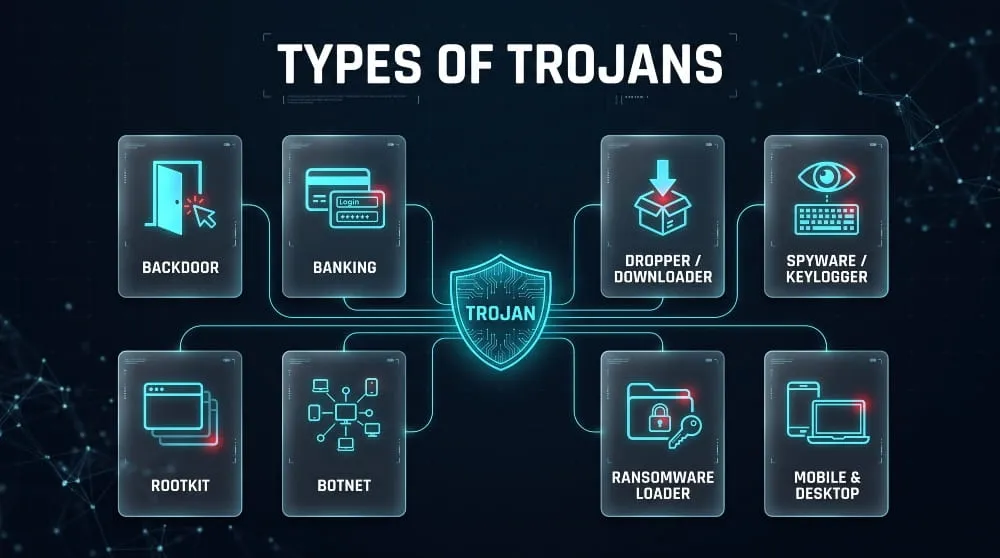
Backdoor trojans
A backdoor trojan creates hidden remote access to an infected device. The attacker can then run commands, browse files, install tools, or use the machine as a foothold in a network. These are especially dangerous in business environments because one infected endpoint can lead to wider compromise.
Banking trojans
Banking trojans steal financial credentials and manipulate online banking sessions. They typically inject fake fields into banking pages, capture login details, or intercept one-time codes. Many have since evolved into general-purpose tools that also steal other credentials and deliver additional malware.
Trojan droppers and downloaders
A dropper contains its malicious payload and installs it on execution, while a downloader is a small program that fetches the payload from the internet afterward. Both aim to deliver a more capable threat to the machine, and they often serve as the first stage of ransomware attacks. Detection names such as “Trojan.Dropper” or “Trojan: Win32/Downloader” point to this category.
Spyware and keylogger trojans
Spyware trojans quietly monitor activity and send the data to an attacker. Keylogger trojans record every keystroke, which exposes passwords, messages, and card numbers as they are typed. Because they produce few visible symptoms, they can run for months before anyone notices.
Rootkit trojans
A rootkit trojan hides its own presence, and that of other malware, from the operating System and security tools. It may modify system files, drivers, or boot components to stay undetected. Rootkits are the hardest trojans to remove, and a full reinstall is often the only reliable fix.
Botnet trojans
A botnet trojan enrolls the infected device into a network of compromised machines controlled by one operator. Attackers then use the botnet for DDoS attacks, spam, credential stuffing, or cryptomining. The device owner often notices nothing beyond a slower connection.
Ransomware delivered by trojans
Many ransomware attacks begin with a trojan. The trojan first gains access and maps the network, then deploys ransomware later, sometimes days later. Catching and removing the initial TrojanTrojan can stop an attack before the encryption phase.
Android, iPhone, Mac and Windows trojans
Windows is the most targeted platform, but trojans exist for every major System. Android trojans usually arrive as apps from unofficial stores or as “clean” apps on official stores that later load malicious code, and many are banking trojans. Mac trojans commonly pose as cracked software, installers, or fake updates. iPhone trojans are rare because of Apple’s app restrictions, and most real cases involve malicious configuration profiles, phishing, or jailbroken devices.
Trojan clickers, agents, and other generic trojan names
Detection names such as “Trojan Clicker” and “Trojan Agent” describe broad behaviors or generic signatures rather than a single malware family. A trojan clicker generates fake clicks or visits on ads and websites, usually for ad fraud, and may also redirect the browser. “Agent” is a catch-all label that security vendors apply to many small trojans with similar traits, so a result like “Trojan.Agent” tells you the category but not the exact threat. SLocker is an Android example, a family of trojans that lock the screen and demand payment. When a scan reports a generic name, check the file’s path and origin before deciding how serious it is.
Famous Trojan Examples
The best-known trojans, including Zeus, Emotet, and TrickBot, started as banking trojans and grew into criminal platforms used to deliver other malware. Studying them shows how trojans evolve and why old names keep turning up in new alerts.
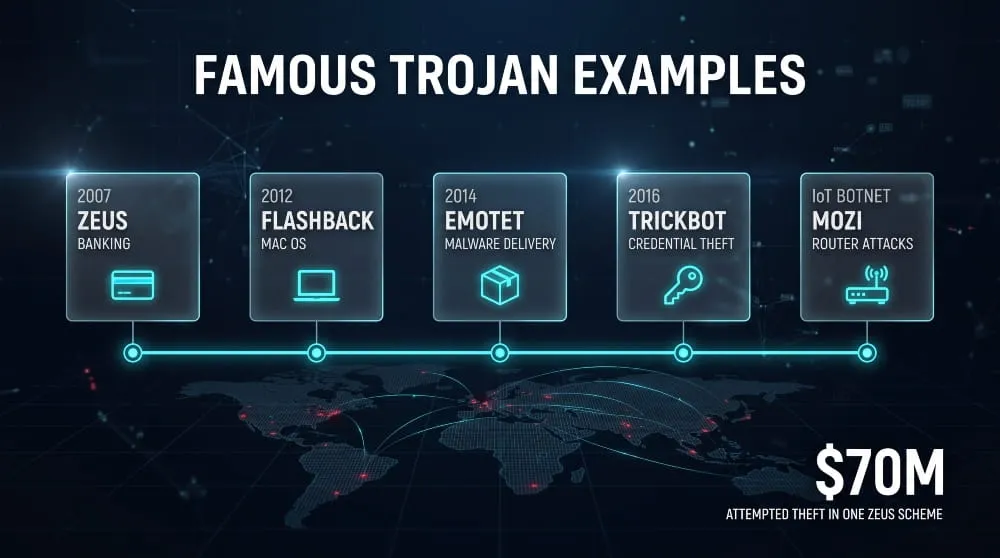
Zeus trojan (including “Zeus 2020 trojan detected” alerts)
Zeus is a banking trojan that appeared around 2007 and became one of the most widespread financial malware families in history. In 2010, the FBI announced charges against dozens of people in a Zeus-based scheme that attempted to steal roughly $70 million from victims’ bank accounts. Its source code later leaked, so many modern trojans descend from it. Be aware that a pop-up reading “Zeus 2020 trojan detected” in your browser is almost always a scareware scam rather than a real detection (see the fake alerts section below).
Emotet
Emotet began in 2014 as a banking trojan and later became a “malware delivery service” that installed other threats, including ransomware, on infected machines. It spread mainly through malicious Office attachments in convincing email replies. Law enforcement agencies across several countries disrupted its infrastructure in January 2021, though it returned later that year.
TrickBot
TrickBot started as a banking trojan in 2016 and grew into a modular platform for credential theft, network reconnaissance, and ransomware delivery. It was closely tied to ransomware operations before its operators shifted to other tools around 2022. Its history shows how a banking trojan can become a stepping stone to large-scale extortion.
Dridex, IcedID and Kronos
Dridex, IcedID, and Kronos are banking trojans that steal online banking credentials and inject content into banking sessions. Dridex and IcedID have also been used as loaders that bring in ransomware. All three are typically delivered by phishing emails with malicious documents.
Citadel
Citadel is a banking trojan derived from Zeus source code, with a plugin-based design and anti-detection features, and it was sold and updated on criminal forums like commercial software. In 2013, Microsoft, working with the FBI and financial industry partners, disrupted many Citadel botnets. This clearly shows how a leaked Trojan can become the foundation for newer malware.
Mozi (Linux botnet), Flashback (Mac), Cerberus, and Anatsa (Android)
Mozi was a peer-to-peer botnet that infected Linux-based IoT devices such as routers and cameras for DDoS attacks, and its activity dropped sharply in 2023. Flashback infected hundreds of thousands of Macs around 2012 by exploiting a Java vulnerability. Cerberus is an Android banking trojan sold as a rental service that overlays fake login screens on banking apps. Anatsa is an Android banking trojan spread through dropper apps disguised as ordinary utilities.
Trojan vs. Worm, Virus, Spyware, Rootkit and Backdoor
The difference comes down to how the threat spreads and what it is built to do. A trojan relies on deception; a virus and a worm self-replicate, and spyware, rootkits, and backdoors describe functions a trojan often performs.
| Threat | Spreads by Itself? | Main Goal |
|---|---|---|
| Trojan | No, relies on the user running it | Gain access, steal data, deliver other malware |
| Virus | Yes, when an infected file is run | Replicate, corrupt, disrupt |
| Worm | Yes, across networks | Spread rapidly |
| Spyware | No | Monitor and collect data |
| Rootkit | No | Hide other malware |
| Backdoor | No | Provide persistent remote access |
| Ransomware | Usually delivered by another threat | Encrypt data and demand payment |
Trojan vs. worm
A worm spreads automatically across networks by exploiting vulnerabilities and requires no user action. A trojan cannot spread on its own and requires a user to run it. In practice, a trojan can deliver a worm, and some worms carry trojan payloads.
Trojan vs. Virus
A virus attaches to legitimate files and replicates when they are executed, while a trojan is a standalone program that hides behind a false identity. Viruses spread through infected files, and trojans spread through trickery.
Trojan vs. spyware
Spyware is defined by its behavior: secretly gathering information. A trojan is defined by its method: disguise. A trojan can contain spyware, and the same malicious file can accurately be described as both.
Trojan vs. rootkit and backdoor
A backdoor provides remote access, and a rootkit conceals malicious activity from the System. Neither describes how malware arrives. Trojans commonly install both, so “backdoor trojan” and “rootkit trojan” are frequent labels.
Is ransomware a trojan?
Ransomware is not a trojan by definition, since its payload is encryption for payment. A trojan often delivers ransomware, and some ransomware disguises itself as legitimate software, making it a trojan by method as well. The two terms describe different parts of the same attack chain.
Trojans Disguised as System Files (csrss.exe, svchost.exe and More)
Trojans often name themselves after real Windows processes such as csrss.exe or svchost.exe to avoid scrutiny. The genuine files are legitimate and necessary, so the question is whether the file on your machine is the real one.
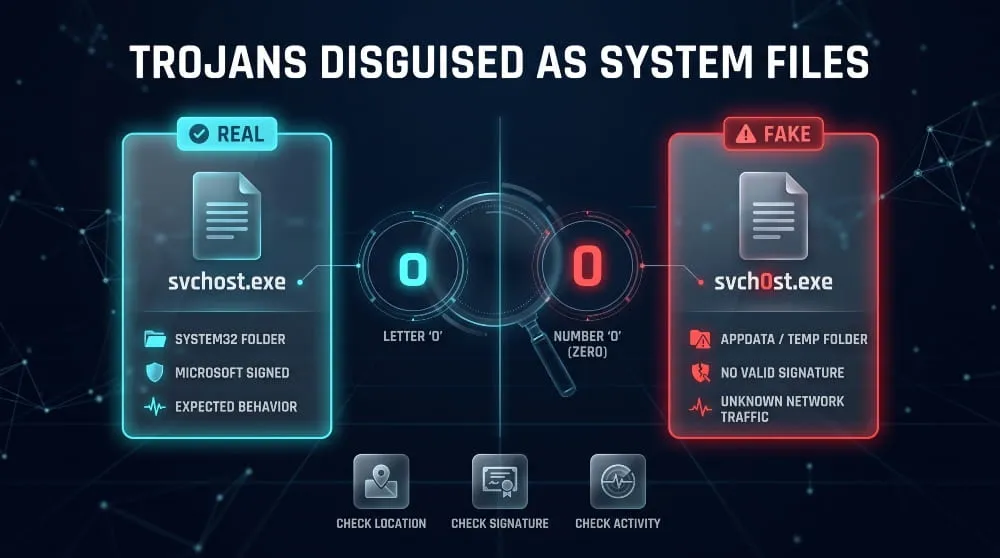
Legitimate Windows processes vs. Trojan impersonators
The real csrss.exe (Client Server Runtime Subsystem) and svchost.exe (Service Host) live in C:\Windows\System32 and are signed by Microsoft. Several instances of both are normal, since csrss.exe runs per session and svchost.exe hosts many separate services. Impersonators use the same name from a different folder or a near-identical spelling such as “svch0st.exe” or “csrs.exe”. Other commonly spoofed names include explorer.exe, lsass.exe, and msiexec.exe.
How to verify a file’s location and signature
Open Task Manager, right-click the suspicious process, and choose Open file location. A genuine Windows process points to C:\Windows\System32 (or a similar system folder). Next, open the file’s Properties, go to the Digital Signatures tab, and confirm Microsoft Windows is the signer. For a stricter check, run Get-AuthenticodeSignature on the file path in PowerShell and confirm the status is Valid.
Warning signs of a fake system process
Suspect a fake process if it runs from AppData, Temp, Downloads, or the root of a drive, has a misspelled name, has no valid Microsoft signature, or uses unusual CPU or network activity. Another red flag is a system process that talks to unfamiliar internet addresses. Do not delete anything from System32 without confirming it is an impostor, because removing a real system file can break Windows.
How to Tell If You Have a Trojan
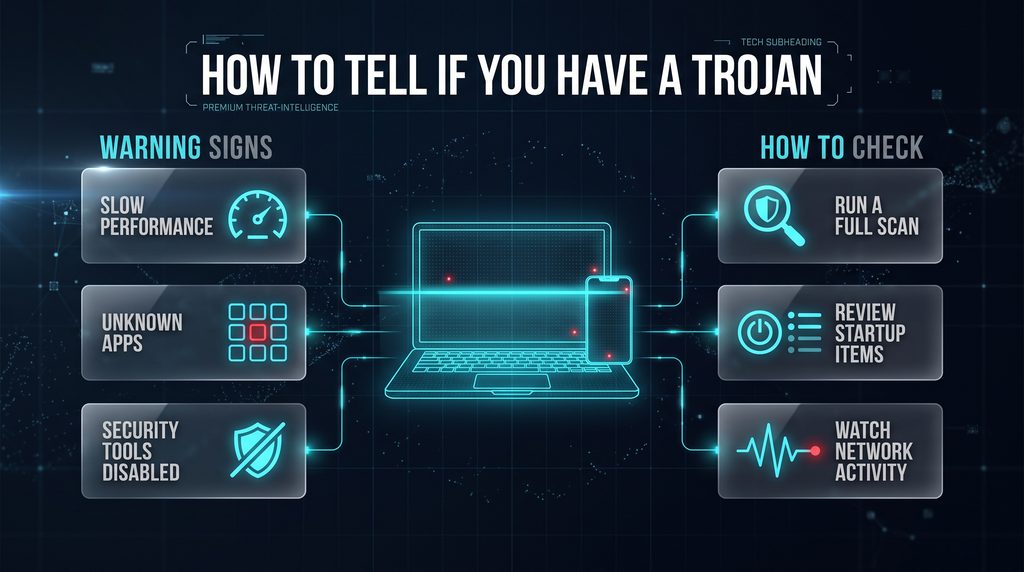
The most reliable signs of a trojan include unexplained system behavior, unfamiliar processes or startup items, unexpected network activity, and security scans that flag a threat. Because good trojans hide, a clean-feeling computer isn’t proof it’s clean.
Symptoms on Windows, Mac, Android and iPhone
On Windows and Mac, watch for slowdowns, unexpected crashes, changed browser homepages, programs you did not install, disabled security software, and fans running with nothing open. On Android, look for rapid battery drain, unfamiliar apps, ads outside the browser, and apps requesting accessibility or device administrator access. On iPhone, true trojans are uncommon, so look for unknown configuration profiles, overheating, and unexplained data use.
How to scan for a trojan (built-in tools and manual checks)
On Windows, run a full scan with Microsoft Defender, then run a Microsoft Defender Offline scan, which reboots the PC and scans before malware can hide. Then check Task Manager, Startup apps, and Task Scheduler for entries you do not recognize. On Mac, review Login Items, Profiles in System Settings, and the Applications folder. On Android, run Google Play Protect and review apps with device admin rights. A second reputable scanner can confirm a questionable result.
Windows Defender or antivirus “trojan detected”: real threat or false positive?
Treat a “trojan detected” alert as real until you have checked it, and it usually is. Look at the detection name, the file path, and whether you recently downloaded something. Detections in your Downloads folder, a cracked program, or a startup location are credible. Generic names such as “Wacatac” come from heuristic detection and can occasionally flag harmless files. If you are unsure, leave the file quarantined, don’t allow or restore it, and scan it with a second scanner.
What does a “Trojan.Malware.xxxxx.susgen” detection mean?
Names like Trojan.Malware.300983.susgen are generic heuristic detections from the MaxSecure engine, which tools such as VirusTotal display alongside dozens of other scanners. “Susgen” is generally read as “suspicious generic”: the engine flagged the file because it looks unusual, not because it matched a known Trojan family, and the number is a signature ID rather than a family name. When MaxSecure is the only engine flagging a signed file from the official developer, it is often a false positive, but a lone detection on a file from an unknown or cracked source should still be treated as suspect. To check, confirm the file came from the vendor’s official site, compare its hash with the published one, see how many other engines flag it, and report suspected false positives to the vendor.
Network and process signs of a backdoor
A backdoor shows up as persistent outbound connections to unfamiliar addresses, especially on unusual ports, or a process communicating when you are idle. On Windows, Resource Monitor or the netstat -ano command lists active connections and the process behind each. A process with no clear purpose repeatedly contacting an unknown server deserves immediate isolation and investigation. Intrusion detection alerts such as Snort “MALWARE-CNC” rules, including those for backdoors like BPFDoor, indicate command and control traffic and should be treated the same way.
Trojan: Win32 Detection Names Explained (Wacatac, Malgent, Generic and More)
A Trojan: Win32 detection means a security product has labeled a file as a trojan that targets Windows programs, and the text after the slash is a family or generic label rather than proof of what the file does. Use the name to understand the category, then judge the file by where it came from, what it does, and whether other scanners agree.
What does Trojan: Win32 mean?
“Trojan” is the malware type and “Win32” is the platform, which in Microsoft’s malware naming scheme means the Windows 32-bit platform (64-bit Windows threats are labeled Win64). It is not the name of one specific Virus. Labels such as “Trojan: Win32/Generic”, “Win32.Trojan.Gen” and “Trojan.Win32.Generic” mean a Windows trojan was flagged by a generic signature or heuristic, usually because the file resembles known malicious behavior without matching a single known family.
How to read a detection name (Type: Platform/Family.Variant!Suffix)
Microsoft names threats in the format Type: Platform/Family. Variant!Suffix, a variation of the CARO naming scheme that many vendors follow with small differences. Take Trojan: Win32/Wacatac.B!ml as an example.
| Part | Example | What It Tells You |
|---|---|---|
| Type | Trojan | What the threat does |
| Platform | Win32 | Where it runs (Windows) |
| Family | Wacatac | A group of related samples, or a generic label |
| Variant | B | A sequential letter for each new version |
| Suffix | !ml |
Extra detail; suffixes beginning with ! are internal Microsoft indicators, and !ml and !MTB are commonly associated with machine-learning or behavior-based detections |
Other vendors differ. Kaspersky uses a Type.Platform.Family form such as TrojanTrojan.Win32.Generic, and prefixes like PDM: and MEM: mark behavior-based or memory-based detections rather than a file signature. Names with long numbers, such as TrojanTrojan.Agent.Win32.4270125 or Trojan.Convagent.Win32.592453, are numbered generic IDs like the susgen names above, and the number is not a family. Network rules, such as Emerging Threats (ETPRO) alerts for Zbot-style traffic on port 53, describe suspicious network behavior rather than a file, so investigate the device that generated the traffic.
Common Trojan: Win32 names and what they usually mean
These names fall into two groups: generic heuristic labels that describe suspicious traits, and named families that describe a known threat.
Is Trojan: Win32 safe? Real threat or false positive?
Treat a Trojan:Win32 detection as unsafe until you have verified it. Generic names such as Malgent, Wacatac, Sabsik, and Trojan.Win32.Generic names do sometimes flag legitimate software, particularly new, unsigned, packed, or modified programs. The risk is highest when the file is a crack, keygen, game mod, or “free” installer, because those are common Trojan carriers. To check, open Windows Security, go to Virus & threat protection, then Protection history, and note the file path and the action taken. Then confirm the file came from the official source, check its signature, and see whether other scanners flag it. A detection on a trusted, signed file that no other engine reports is more likely a false positive, while a detection on a cracked program should be assumed real.
How to remove Trojan: Win32
To remove a Trojan: Win32 detection, quarantine or remove the file, run a full and offline scan, check for persistence, and reset any passwords that may have been exposed.
- Open Protection history in Windows Security, note the file path, and choose Remove or Quarantine rather than Allow.
- Run a full Microsoft Defender scan, then a Microsoft Defender Offline scan.
- Check Startup apps, Task Scheduler, and browser extensions for entries you do not recognize, as described in the removal steps below.
- If the name is an infostealer or banking family such as Lumma, Agent Tesla, Raccoon, Zbot, or Emotet, change your passwords from a clean device and check your accounts.
- If the detection keeps returning or security tools are disabled, back up your personal files and reinstall Windows.
Fake Trojan Alerts and Scareware
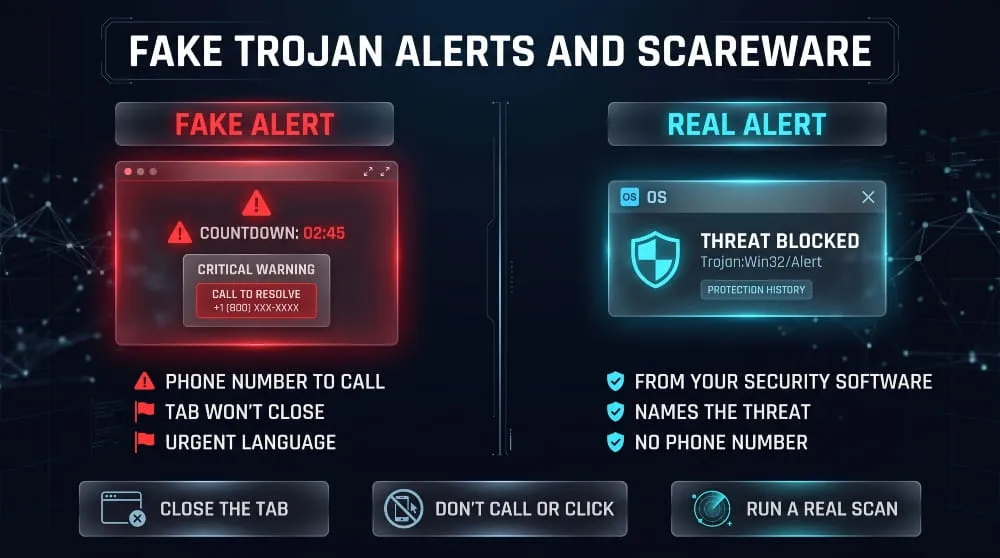
Fake trojan alerts are browser pop-ups or notifications that falsely claim your device is infected, aiming to scare you into calling a scammer or installing something harmful. A real operating system or antivirus doesn’t announce infections on a web page.
“Trojan spyware alert” pop-ups on Windows, Mac and iPhone
Popular fake alerts include “Trojan spyware alert”, “Zeus 2020 trojan detected”, and “Apple System Security Center” warnings, often with a loud sound, a countdown, and a support phone number. They run in your browser and aren’t scans of your device. The same scam appears on Windows, Mac, and iPhone, adapted with matching logos.
“Trojan found in /Win32” pop-ups.
A browser message reading “Microsoft Windows Defender: Trojan found in /Win32”, usually with a phone number or a “Remove now” button, is a scam. Real Defender alerts appear as Windows Security notifications that name the threat, such as Trojan: Win32/Wacatac, and link to details in Protection history. They never ask you to phone anyone. If you are unsure, close the browser, open Windows Security from the Start menu, and check Protection history yourself.
How to spot a fake Microsoft or Apple warning
Signs of a fake warning include a phone number to call, a browser tab that will not close, urgency language, spelling errors, and claims that your device is “locked”. Neither Microsoft nor Apple displays virus warnings with a support number on a web page. A genuine detection appears inside the security software or the operating System’s own notification area.
What to do (and not do) when you see one
Close the tab or force-quit the browser, and don’t call the number, click the buttons, or install a recommended “cleaner.” If the page keeps reopening, clear the browser’s recent session and remove any notification permission it gained. Then run a real scan to be safe. If you already called the number, gave remote access, or paid, treat the device as compromised and follow the removal and recovery steps below.
How to Remove a Trojan Step by Step
To remove a Trojan, disconnect the device from the internet, boot into a clean environment such as Safe Mode, run a full offline scan, remove persistence points, and then secure your accounts from a clean device. If the infection involved a rootkit or you cannot be sure it is gone, a full reinstall is the safest option. Built-in tools such as Microsoft Defender and Defender Offline are free and handle most cases, so a paid or “free download” trojan remover is rarely necessary, and fake removal tools are themselves a common trojan lure.
Disconnect and isolate the device.
Cut off the Trojan’sTrojan’s connection first by turning off Wi-Fi, unplugging Ethernet, or enabling airplane mode. This stops data theft and prevents the attacker from issuing new commands. Do not log in to any accounts on the infected device from this point on.
Safe mode removal on Windows
Safe Mode loads only essential components, which prevents many trojans from starting. To use it:
- Open Settings, go to System, then Recovery, and choose Restart now under Advanced startup.
- Select Troubleshoot, Advanced options, Startup Settings, then Restart.
- Choose Safe Mode (without networking).
- Run a full Microsoft Defender scan, then a Microsoft Defender Offline scan.
- Remove or quarantine everything it finds, then restart normally and scan again.
Manual removal and cleanup of persistence points
After scanning, check the places a trojan uses to survive restarts. These include Task Manager’s Startup tab, Task Scheduler, the Run keys in the registry, browser extensions, and the Services list. Remove entries that point to files you cannot account for, and delete the associated files only after confirming they are not system files. If you are unsure about a registry entry, don’t edit it without thinking.
Removing a trojan from Mac, Android and iPhone
On Mac, remove unknown apps, Login Items, and configuration profiles, delete suspicious LaunchAgents and LaunchDaemons, and scan with a reputable anti-malware tool. On Android, boot into Safe Mode, revoke device administrator access from the suspicious app, uninstall it, and run Play Protect. On iPhone, delete unknown configuration profiles, update iOS, clear Safari data, and, if the problem persists, back up your data and restore the device.
Removing backdoor, keylogger, and banking trojans
Backdoor, keylogger, and banking trojans do their damage by stealing data, so removing the file is only half the job. Assume every password, session, and card that was used on the device is exposed. Remove the malware, then change credentials from a different clean device. If the machine handled business systems or sensitive data, escalate to your IT or security team.
When a full reinstall is the safer option
Reinstall the operating System if scans keep finding threats, security tools won’t re-enable, you suspect a rootkit, or the device holds sensitive data. Back up only personal files such as documents and photos, scan them separately, and avoid restoring programs or system settings. A clean reinstall is more reliable than trying to prove that a deeply embedded trojan is gone.
What to Do After a Trojan Infection
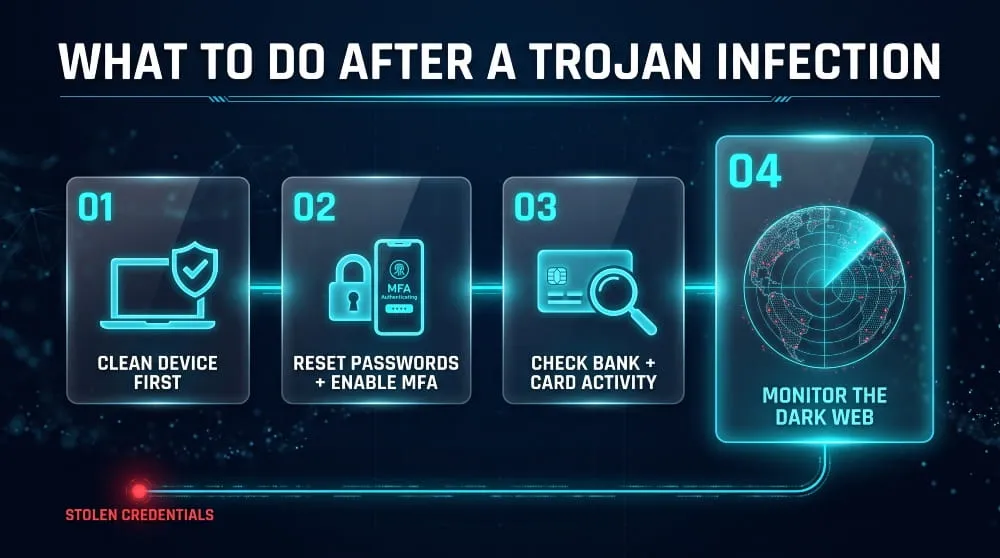
After removal, assume your credentials were stolen and act on that. Prioritize changing passwords from a clean device, securing financial accounts, and checking whether your data is already circulating online.
Change passwords and enable MFA from a clean device.
Change passwords for email, banking, work accounts, and any service saved in your browser, using a device that has never been infected. Start with your primary email, because it can reset all the others. Turn on multi-factor authentication, preferably with an authenticator app or passkey rather than SMS, and sign out of all active sessions.
Check bank and financial accounts.
Review recent transactions on bank accounts, cards, and payment apps for anything you do not recognize, and contact your bank right away if something looks wrong. Consider a credit freeze if the device stored personal identity details. Keep watching statements for several weeks, as stolen data is sometimes used well after the infection.
Why trojan-stolen credentials end up on the dark web
Trojans such as banking trojans and infostealers harvest logins, cookies, and card details in bulk, and attackers sell or trade that data on dark web markets and forums. Buyers use it for account takeover, fraud, and further intrusions, often long after the original infection is removed. That is why cleaning the device doesn’t undo the damage.
How to check whether your data has been exposed
The practical way to find out is to check your email addresses and domains against breach and dark web monitoring sources. Look for your credentials appearing in leaks, and treat any match as a reason to rotate that password immediately. For organizations, continuous monitoring is more reliable than one-off checks, because new leaks appear constantly.
How to Prevent Trojan Attacks
Preventing trojans comes down to controlling what gets installed, keeping software current, and limiting the damage if something slips through. Most infections start with a user decision, so habits matter as much as tools.
Safe download and email habits
Download software only from official sites and app stores, avoid cracked or pirated programs, and verify installers before running them. Treat unexpected attachments and “update required” prompts as suspicious, and never enable macros in documents from unknown senders. If a message creates urgency, confirm it through another channel.
Patching and system hardening
Keep your operating system, browser, and applications updated, since many trojans rely on known vulnerabilities after the initial lure. Use a standard user account for daily work rather than an administrator account, keep built-in protections like Microsoft Defender and Gatekeeper switched on, and back up important data offline.
Endpoint protection and monitoring for businesses
Businesses should deploy endpoint detection and response (EDR), restrict software installation, filter email attachments, and log outbound network traffic. Behavior-based monitoring catches trojans that signature-based antivirus misses. Pair these controls with monitoring for leaked employee credentials so you catch a compromised account before it is used.
Security awareness tips for teams
Train employees to recognize phishing attachments, fake update prompts, and scareware pop-ups, and give them a simple, blame-free way to report suspicious files. Short, regular exercises work better than annual lectures. A culture that encourages quick reporting limits how far a trojan can spread.
Monitor for Trojan-Stolen Data with DeXpose
Removing a trojan stops the infection, but it doesn’t recover credentials it already stole. Dark web monitoring tells you whether stolen data is being traded.
How DeXpose’s dark web monitoring detects leaked credentials
DeXpose is a dark web monitoring and threat intelligence platform that watches for exposed credentials and sensitive data linked to your email addresses and domains. If trojan-stolen logins surface in dark web leaks, you can learn about them early and reset affected accounts before attackers use them against you or your organization.
If you have had a Trojan infection, or want to catch the next one early, check your exposure with DeXpose. Visit dexpose.io to run a scan or book a demo.
Frequently Asked Questions (FAQ)
What is a trojan in computer terms?
A trojan is malware that disguises itself as legitimate software to trick users into installing it. Once running, it can steal data, give an attacker remote access, or install other malware. It does not spread on its own and depends on the user running it.
Is a trojan a virus?
No, a trojan isn’t technically a virus because it doesn’t replicate or attach to other files. It is a separate malware category defined by deception. The phrase “trojan virus” is common in everyday use, and both need to be removed.
Can a trojan steal passwords and banking details?
Yes. Banking trojans, keylogger trojans, and spyware trojans are designed to capture saved passwords, keystrokes, session cookies, and card or banking details. After an infection, change passwords from a clean device and monitor your financial accounts.
Can iPhones and Macs get trojans?
Yes, although they are targeted less often than Windows and Android. Macs can be infected by trojans disguised as cracked software or fake installers. iPhones rarely get true trojans, but they can be affected by malicious configuration profiles, phishing, and jailbreaking.
Can you remove a trojan without antivirus?
Sometimes, but it is difficult and unreliable. You can remove many trojans manually by using Safe Mode, checking startup items, and deleting the malicious files. Without a scan, it is easy to miss secondary components, and for serious infections, a full operating system reinstall is safer.
Is a “trojan detected” alert always real?
No. Take an alert from your installed security software seriously, but a browser pop-up claiming it found a trojan is almost always a scam. Real detections come from your operating system or antivirus, never from a web page, and they do not ask you to call a phone number.
Can a trojan come back after removal?
Yes. A trojan can return if you miss persistence points, install a second payload, or reinfect yourself by reusing the same compromised file or password. A full offline scan, a persistence check, and a credential reset reduce the risk, and a clean reinstall removes it.
Is a trojan a type of malware?
Yes. Malware is the broad category, and a trojan disguises itself as legitimate software. Other types of malware include viruses, worms, ransomware, and spyware.
What is the difference between malware and a trojan?
Malware is any software designed to cause harm, while a trojan is one kind of malware defined by how it spreads: through deception rather than self-replication. All trojans are malware, but not all malware is a trojan.
How do I prevent trojan malware?
Download software only from official sources, avoid cracked programs, treat unexpected attachments as suspicious, keep your System and apps updated, use a standard user account for daily work, and leave real-time protection switched on.
Is a Trojan.Malware Susgen detection: a real infection?
Not necessarily. Susgen names are generic heuristic detections, and a single-engine hit on a trusted, signed file is often a false positive. Verify the file’s source and hash, and check whether other scanners agree before deciding.
What does Trojan: Win32 mean?
Trojan: Win32 is a security product’s label for a trojan that targets Windows programs: “Trojan” is the type and “Win32” is the platform. The name after the slash is a family or generic label, and it doesn’t, by itself, indicate how dangerous the file is.
Is Trojan: Win32/Wacatac or Malgent a false positive?
It can be, but treat it as real until verified. Wacatac and Malgent are generic heuristic names that occasionally flag legitimate software, and they also commonly appear on cracked programs. Check the file’s source and signature, and see whether other scanners agree.
How do I remove Trojan: Win32?
Open Protection history in Windows Security, quarantine or remove the file, then run a full and offline Microsoft Defender scan. Check startup items for persistence and change your passwords if the detection is an infostealer or banking family.
Article Link: Computer Trojan | What It Is, Types & How to Remove It