Spyware is malicious software that secretly installs itself on a phone or computer, collects information about you, such as passwords, messages, browsing activity, and location, and sends it to someone else without your consent. It can log keystrokes, capture screens, and switch on a camera or microphone, and it is designed to stay invisible. This guide covers what spyware is, how it spreads, the main types, real examples, how to detect and remove it, whether it is legal, and where the stolen data ends up.
Introduction to Malware Binary Triage (IMBT) Course
Looking to level up your skills? Get 10% off using coupon code: MWNEWS10 for any flavor.
Enroll Now and Save 10%: Coupon Code MWNEWS10
Note: Affiliate link – your enrollment helps support this platform at no extra cost to you.
What Is Spyware?
Spyware is software that monitors a person’s activity, collects their data without informed consent, and reports it to a third party. Secrecy is what separates it from ordinary software that gathers analytics and tells you.
Spyware Definition in Simple Words
Spyware is a hidden program that watches what you do on a device and passes the details to someone else. That someone might be a cybercriminal after your bank login, an advertiser building a profile, a jealous partner, or a government buyer of surveillance tools.
Spyware Meaning in Cybersecurity (CISA / NIST wording)
In security standards, spyware is software secretly installed on a system to gather information about individuals or organizations without their knowledge. Government guidance from bodies such as NIST and CISA defines it by three traits: covert installation, covert data collection, and benefit to a party other than the device owner. If a program lacks any one of those, it is usually better described as adware, telemetry, or a legitimate monitoring tool.
Spyware vs. Malware: Where It Fits
Spyware is a category of malware, which is the broader term for any software built to harm or exploit its victim. Spyware is defined by its goal. Ransomware locks your files for payment and wipers destroy data, while spyware wants you to keep using your device normally so it can keep watching.
Synonyms and Related Terms (snoopware, stalkerware, surveillanceware)
Snoopware and surveillanceware are informal synonyms for spyware. Stalkerware is spyware installed by someone in the victim’s personal life, often a partner or ex, to track their movements and messages. Related terms include spy app, keylogger, and infostealer, which describe specific kinds of spyware covered below.
How Does Spyware Work?
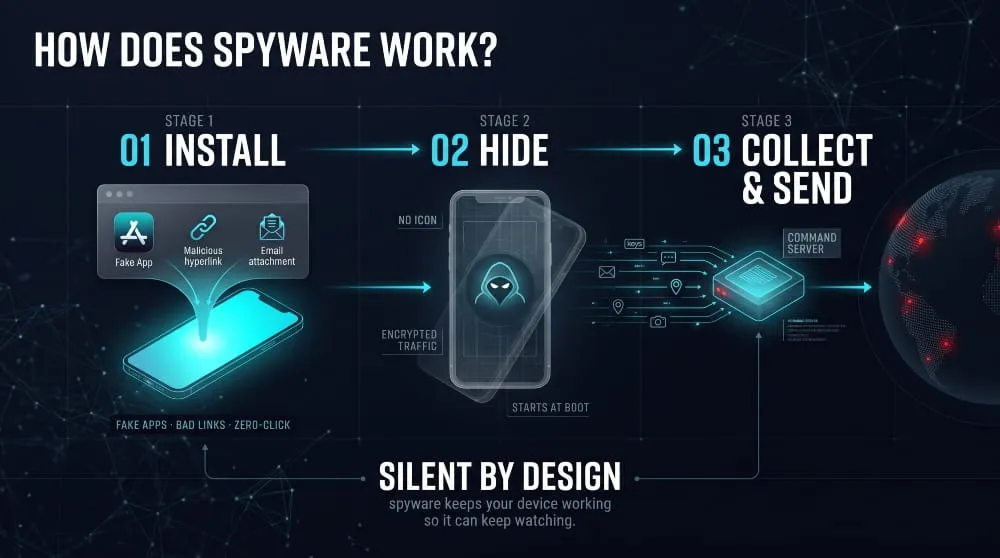
Spyware works in three stages: it gets onto a device, hides itself, and quietly collects data and sends it to a server controlled by its operator. Most of the technical effort goes into the second stage, because spyware that gets noticed gets removed.
What Spyware Is Designed to Do
Spyware is designed for long-term observation. Operators use it to steal credentials, commit fraud, spy on rivals or individuals, or sell the collected data. Unlike a virus, it rarely damages the device, because a healthy device keeps producing data.
What Data Spyware Collects
Spyware can capture keystrokes, saved passwords, browser history, screenshots, clipboard contents, text messages, call logs, contacts, files, GPS location, and live audio or video from the microphone and camera. Mobile spyware often asks for accessibility or device-administrator permissions, because those unlock most of this access in one step.
How Spyware Gets Installed
The most common routes are bundled software, where spyware rides along with a free download, and malicious links or attachments delivered by email, text message, or messaging apps. Fake apps that impersonate popular services are another major route, especially on Android, where users are tricked into installing apps from outside the official store. Attackers can also install spyware manually when they briefly access an unlocked device.
Zero-Click Spyware: Infection Without Any Tap
Zero-click spyware infects a device without the victim opening a link, tapping a message, or installing anything. It exploits a flaw in how an app or operating system processes incoming data, such as a specially crafted message. These attacks are expensive and typically reserved for high-value targets like journalists, activists, and officials, which is why most people are far more likely to encounter spyware through a fake app or a bad download.
How Spyware Hides and Persists
Spyware hides by disguising itself as a system process or a harmless utility, removing its own icon, and encrypting its traffic. It persists by registering to launch at startup, abusing administrator rights to resist uninstallation, or reinstalling itself through a hidden companion component. Some advanced tools leave almost no disk traces and vanish after a reboot.
Where the Stolen Data Goes
The data goes to a command-and-control server, then the operator uses it directly or sells it. Stolen logins commonly end up in criminal marketplaces, where they fuel account takeover and fraud, as explained in the dark web section later in this guide.
Types of Spyware
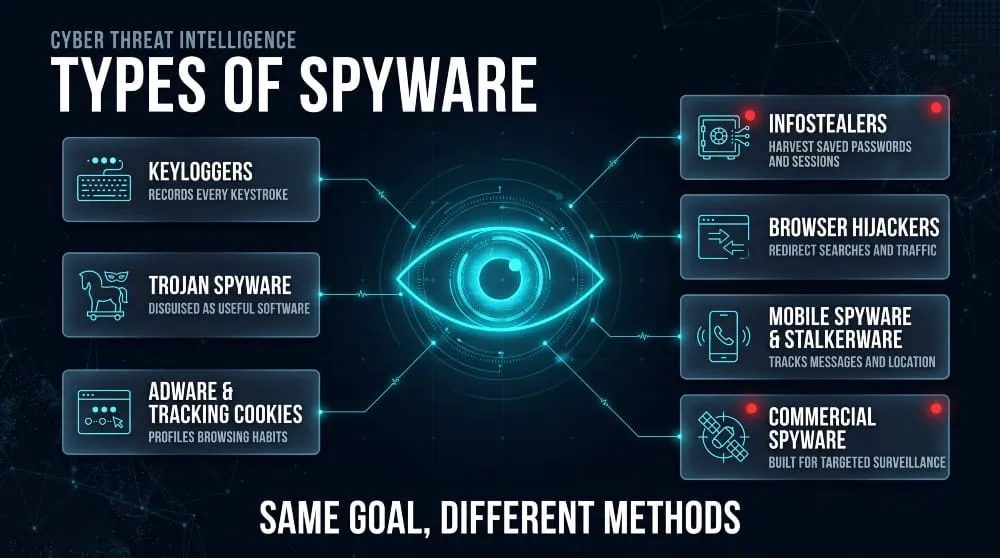
The main types of spyware are keyloggers, Trojan spyware, adware and tracking cookies, infostealers, browser hijackers, mobile spyware, and commercial surveillance tools. They differ in what they capture and in who deploys them.
Keyloggers and Keystroke Loggers
A keylogger records everything typed on a keyboard, which exposes passwords, card numbers, and private messages. Software keyloggers run as hidden programs, while hardware keyloggers are small devices plugged in between a keyboard and a computer.
Trojan Spyware
Trojan spyware arrives disguised as something useful, such as a cracked program, a document, or a free utility, and then performs surveillance in the background. The disguise is the delivery mechanism, so the user installs it willingly without knowing what it does.
Adware and Tracking Cookies
Adware displays unwanted ads, and aggressive versions also track browsing habits to target them. Tracking cookies are small files that follow you across websites. Most cookies are not spyware, but cookies that profile users across sites without disclosure sit in a gray area that privacy laws increasingly regulate.
Infostealers
Infostealers are spyware that harvest saved passwords, browser cookies, session tokens, and crypto wallets in one sweep, then ship them as a bundle called a log. They are the fastest-growing consumer-level form of spyware, and DeXpose covers them in depth in its guide to infostealer malware.
Browser Hijackers and Toolbars
Browser hijackers change a browser’s homepage, search engine, or settings to redirect traffic and record searches. Malicious extensions can do the same quietly, reading every page you visit, so scrutinize extension permissions.
Mobile Spyware and Stalkerware
Mobile spyware targets smartphones and tablets to read messages, track location, and record calls. Stalkerware is the personal-surveillance version, often marketed as parental control or anti-theft software but used to monitor another adult without consent.
Mercenary, Commercial and Government Spyware
Mercenary or commercial spyware is built by private vendors and sold to governments and law enforcement, usually with zero-click capability and strong anti-forensic features. It is expensive and rarely aimed at ordinary users, but it has repeatedly been used against journalists, lawyers and opposition figures.
Webcam, Microphone and Screen-Capture Spyware
This type focuses on sensory access: turning on the camera or microphone, or taking periodic screenshots. It is common in sextortion scams and in targeted surveillance. An unexpected webcam light is a classic warning sign.
Corporate and Employer Monitoring Software (where it crosses the line)
Employers can legally monitor company-owned devices in many jurisdictions, provided they have disclosed it. The same tools become spyware when they run secretly, capture personal accounts, or are installed on personal devices without agreement.
Spyware Examples: Famous Attacks and Families
The best-known spyware examples include the commercial surveillance tools Pegasus, Predator, and Graphite, along with older consumer-era programs such as CoolWebSearch and Gator. Together they show how spyware moved from annoying adware to state-grade surveillance.
Early Spyware (CoolWebSearch, Gator, Bonzi Buddy, Sony BMG rootkit)
Early 2000s spyware was mostly about advertising and hijacking. CoolWebSearch redirected browsers, while Gator and Bonzi Buddy tracked behavior and pushed ads. In 2005, Sony BMG music CDs installed copy-protection software that hid like a rootkit on listeners’ computers, and the company recalled the discs after public backlash.
Pegasus and NSO Group
Pegasus, developed by Israel’s NSO Group, is the most famous commercial spyware. A 2021 investigation by Amnesty International and the Forbidden Stories consortium examined a leaked list of more than 50,000 phone numbers that NSO’s government clients are believed to have selected as potential targets. Pegasus has used zero-click exploits to take over iPhones and Android phones, and Google’s security team tracked an early Android variant called Chrysaor.
Predator and Intellexa
Predator is a mobile spyware product developed by the Intellexa alliance, with roots in the vendor Cytrox. It was delivered mostly through one-click links and later through network-based injection, and the US government sanctioned Intellexa-linked entities in 2024.
Graphite
Graphite is spyware from the Israeli company Paragon Solutions. In early 2025, WhatsApp said it disrupted a campaign targeting around 90 users, including journalists and civil society members, putting Graphite on the public map.
Candiru, Hermit, FinFisher and Chrysaor
In 2021, the US added Candiru, an Israeli vendor, to a trade blocklist alongside NSO Group. Researchers attributed Hermit to the Italian vendor RCS Lab and traced its spread through carrier-assisted links. FinFisher, sold by a German company, was used against activists in several countries before the firm shut down in 2022.
Android Campaigns (ClayRat and others)
Zimperium researchers documented ClayRat, an Android spyware campaign, in late 2025, with more than 600 samples and over 50 dropper apps seen in just three months. It spread through Telegram channels and phishing sites impersonating apps like WhatsApp, TikTok, and YouTube, and it abused Android’s default SMS handler role to read messages and bypass permission prompts.
Recent Spyware Attacks and 2025–2026 Trends
Recent activity shows three trends: faster-evolving Android campaigns, commercial tools found operating for months before being patched, and steady growth in credential-stealing malware. Palo Alto Networks documented LANDFALL, a commercial-grade Android spyware family that stayed active for nearly a year before the underlying flaw was fixed. Operation Triangulation, disclosed by Kaspersky in 2023, showed that even fully updated iPhones could be hit through zero-click exploits.
Signs You Have Spyware
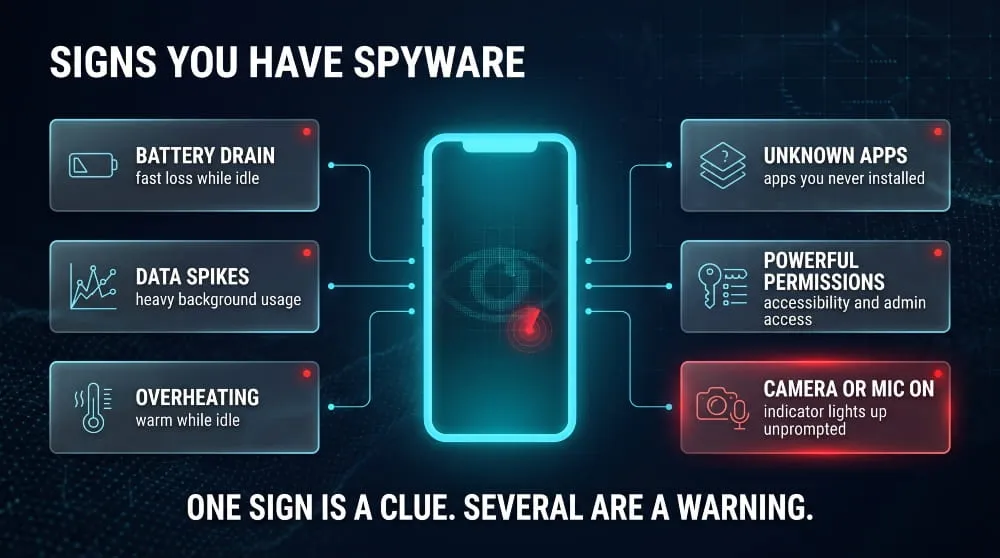
The clearest signs of spyware include unexplained battery drain, high data usage, slowdowns, unfamiliar apps or permissions, and a camera or microphone indicator that turns on by itself. No single sign proves infection, but several together justify a closer look.
Warning Signs on a Computer
On a computer, watch for a changed browser homepage or search engine, new toolbars, pop-ups, sluggish performance, unknown processes in the Task Manager, and security software turned off without your action. Fans spinning while the machine is idle can also indicate background activity.
Warning Signs on a Phone
On a phone, look for apps you didn’t install; apps with a blank name or no icon; unexpected accessibility or device-administrator access; a device that feels warm while idle; and messages or settings that change on their own. An overheating phone with a fast-draining battery deserves attention.
Battery, Data Usage and Performance Red Flags
Spyware sends data constantly, so it consumes battery and mobile data in the background. Check the battery and data usage lists for apps using far more than their purpose justifies. A sudden jump in data use with no change in your habits is one of the more reliable indicators.
Strange Permissions, Unknown Apps and Processes
Review which apps hold powerful permissions such as accessibility, device admin, notification access, SMS, and screen recording. If a flashlight or wallpaper app has any of those, it’s suspicious. On a computer, unfamiliar startup entries and processes with random names are the equivalent warning.
How to Detect Spyware
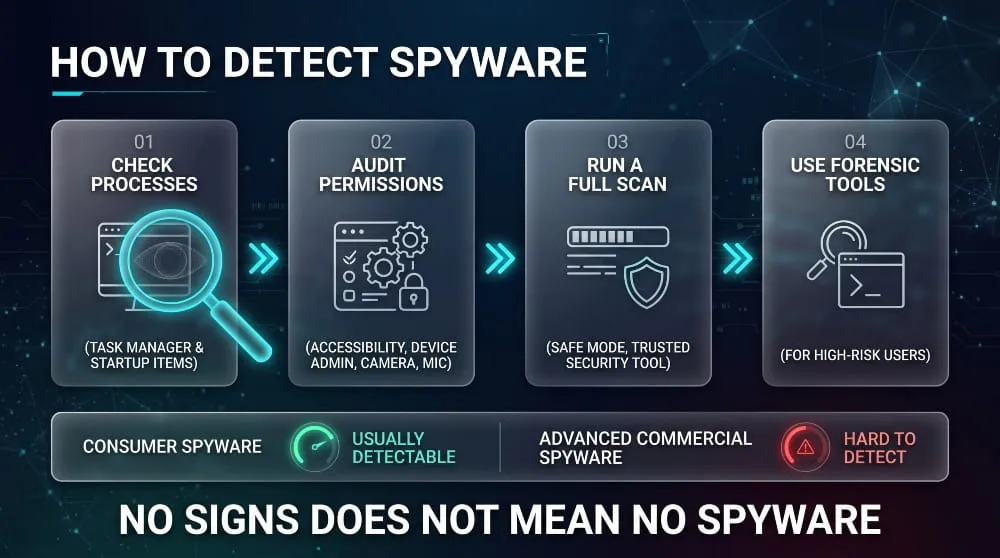
You can detect spyware by manually auditing apps, permissions, and startup items, then confirming with a reputable security scan. Neither method is perfect, so combine both when you have real suspicion.
How to Check for Spyware Manually (Task Manager, app permissions, startup items)
Open Task Manager or Activity Monitor and look for unfamiliar processes, then review startup items and installed programs for anything you didn’t add. On a phone, review the app list and permission manager, and check which apps have device-administrator and accessibility access. Remove or investigate anything you cannot explain.
How to Run a Spyware Scan (what a scan can and cannot find)
To run a spyware scan, update a reputable security product and run a full scan, preferably after restarting in Safe Mode. A scan reliably finds known consumer spyware and common infostealers. It is far less likely to find advanced commercial spyware, which is built specifically to evade ordinary antivirus.
Detecting Spyware on Phones (permission audits, device-admin lists, forensic tools)
On phones, the most useful checks are a permission audit, a review of device-admin apps, and prompt updates. Highly targeted people can use forensic tools from human-rights organizations, such as the Mobile Verification Toolkit built by Amnesty International’s Security Lab, which checks a device backup for known indicators of compromise.
Can Spyware Be Detected at All?
Most consumer spyware is detectable because it leaves traces such as odd permissions, background processes, and unusual network traffic. The most advanced mercenary tools are designed to leave minimal evidence, so the absence of signs doesn’t prove safety for people with a high-risk profile.
Fake Spyware Alerts and Scams
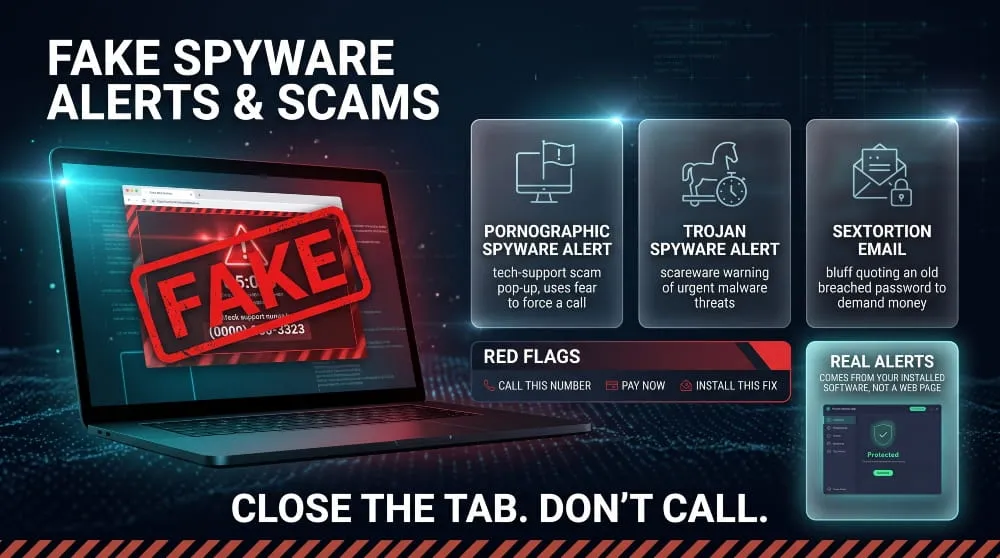
Fake spyware alerts are scareware pop-ups or messages that falsely claim your device is infected and push you to call a number, pay, or install real malware. A genuine security product warns you through its own app, not through a browser pop-up with a phone number.
“Pornographic Spyware Alert” Pop-Ups Explained
The “pornographic spyware alert” is a browser pop-up, often imitating a well-known software company, that claims your device has been infected after viewing adult content and tells you to call a support line. It is a tech-support scam. Close the browser tab or force-quit the browser; don’t call the number or give anyone remote access.
“Trojan Spyware Alert” Scareware: How to Tell It’s Fake
The “trojan spyware alert” works the same way, with flashing warnings, sirens, and a countdown. Real alerts come from security software already installed on your device, and they never demand an immediate payment or a call to a number shown on a web page. Clearing your browser’s cache and reviewing recently granted notification permissions usually stops the pop-ups.
Sextortion Emails That Claim Spyware Recorded You
Sextortion emails claim a hacker used spyware to record you through your webcam and demand payment. These are mass-mailed bluffs, and they often quote an old password taken from a past data breach to look convincing. Seeing a real password in the message means a service you used was breached, not that your webcam was hacked, so change that password and check where it was exposed.
“Is [App or Game] Spyware?”: How to Tell Real Spyware From Normal Telemetry
Many people search whether a particular app or game is spyware. The practical test is disclosure and scope: legitimate software documents what it collects, asks for permissions that match its function, and lets you opt out, while spyware hides what it collects and takes access it has no reason to need. Anti-cheat tools and launchers that collect system data are often reported as spyware, but openly collecting data for a stated purpose isn’t the same as secret surveillance.
How to Remove Spyware
To remove spyware, disconnect the device from the internet, remove the malicious app or program, run a full security scan, update the system, and change your passwords from a different, clean device. If the device is heavily compromised, a factory reset is the most reliable fix.
If you suspect a partner or someone close to you installed stalkerware, prioritize your safety before removing it. Removal can alert the person monitoring you, so consider contacting a domestic violence support organization first and using a safe device for any help-seeking.
Step-by-Step Removal on a Computer
- Disconnect from the internet to stop data from leaving the device.
- Restart in Safe Mode so the spyware is less likely to be running.
- Uninstall unfamiliar programs and remove suspicious browser extensions.
- Run a full scan with a reputable security product, then follow its quarantine and removal steps.
- Reset browser settings, update the operating system, and reconnect.
- Change important passwords from a clean device, then re-enable multi-factor authentication.
Step-by-Step Removal on a Phone
- Update the operating system to the latest version.
- Review apps with accessibility, device-administrator, or notification access and revoke access for anything unfamiliar.
- Uninstall suspicious apps, using Safe Mode on Android if an app resists removal.
- Run a scan with a mobile security app from a trusted vendor.
- If symptoms continue, back up only essential data, such as photos and contacts, then factory reset the device.
- Change account passwords from a different device.
Does a Factory Reset Remove Spyware?
A factory reset removes most consumer spyware by wiping apps and settings, but it doesn’t protect against highly advanced threats embedded in firmware. Restoring from a backup made while the device was infected can reinstate the spyware, so set the device up as new and restore only photos, contacts, and files, not a full system backup.
What to Do Right After You Find Spyware (change passwords, secure accounts, tell your bank)
Treat everything typed or stored on the device as exposed. Change your email password first, then your banking and social accounts; turn on multi-factor authentication; review account login activity for unknown sessions; and tell your bank if financial details may have been captured. Checking whether your credentials already surfaced in leaked data is the final step, covered in the dark web section below.
How to Prevent Spyware and Protect Yourself
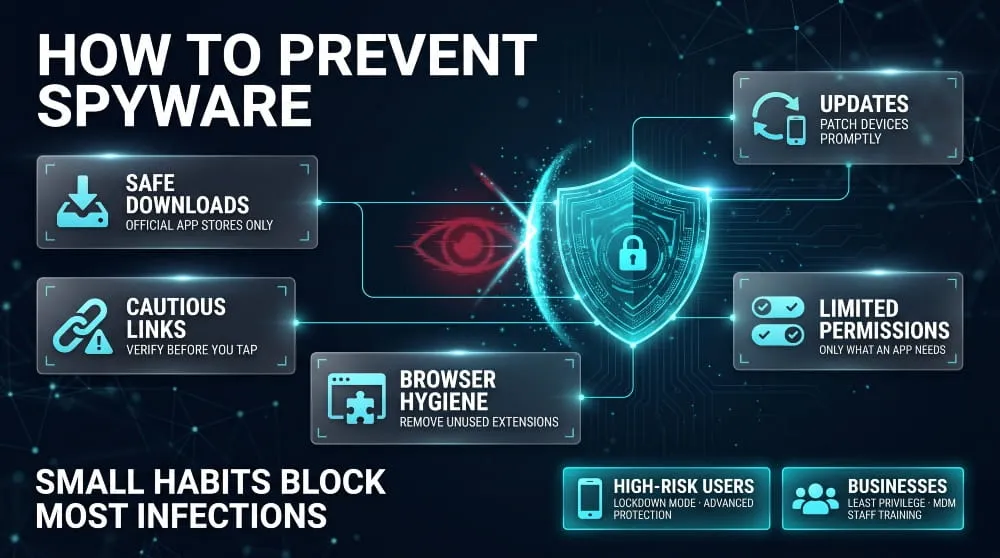
You can prevent most spyware by installing software only from official sources, keeping every device updated, avoiding unexpected links and attachments, and limiting app permissions. Because spyware relies on trust and neglect, small, consistent habits block most infections.
Safe Download and Link Habits
Install apps only from official stores, and avoid cracked software, a leading carrier for infostealers. Treat unexpected links in text messages, email, and chat apps as untrusted, even when they appear to come from a friend, since attackers hijack accounts to spread links.
Updates, Firewalls and Endpoint Protection
Install operating-system and app updates promptly, because most spyware exploits known flaws that are already patched. Keep the built-in firewall on and use reputable endpoint protection on computers. For organizations, centralized patching and endpoint detection close the gaps that individual users miss.
Browser and Extension Hygiene
Keep the number of browser extensions small, read the permissions they request, and remove any you no longer use. Extensions that can read all sites are powerful, and several popular ones have been sold to new owners who then added tracking.
Phone Hardening (Lockdown-style modes, app-store-only installs)
On phones, restrict app permissions, block installations from unknown sources, and use a screen lock others cannot guess. People at elevated risk can enable Lockdown Mode on iPhone or Advanced Protection on recent versions of Android, which shrink the attack surface used by zero-click exploits.
Protection for Businesses (least privilege, MDM, user training)
Organizations should apply least-privilege access, enforce mobile device management on work phones, restrict sideloading, and train staff to recognize phishing. Monitoring for exposed employee credentials adds an early-warning layer, because stolen logins often appear in criminal channels before an attack is noticed.
Is Spyware Dangerous? Risks and Effects
Yes, spyware is dangerous because it exposes a device’s most sensitive information and often goes unnoticed for months. The damage ranges from stolen passwords to full financial fraud and risks to physical safety.
Privacy Loss and Identity Theft
Spyware captures the details needed to impersonate someone: logins, personal documents, contacts, and messages. That gives criminals what they need to open accounts or answer security questions in your name.
Financial Fraud and Account Takeover
Spyware can collect banking logins, card numbers, and session tokens and use them within minutes to drain accounts or take over email, which then unlocks every other account tied to it.
Corporate Espionage and Data Breaches
Spyware on an employee’s device can expose business email, internal systems, and customer data. Many corporate breaches start with one infected laptop or phone, and attackers later use stolen credentials to access company systems.
Harassment and Stalking
Stalkerware turns a phone into a tracking device, giving an abuser a victim’s location, messages, and call history. This is why advocates treat it as a form of technology-facilitated abuse, and why safe removal matters.
Is Spyware Illegal?
Installing spyware on someone else’s device without their consent is illegal in most jurisdictions, but some monitoring is lawful when it is disclosed and has a legitimate purpose. Laws vary by country and state, and this section is general information, not legal advice.
Spyware Laws (US federal law, California, the EU)
In the United States, covert spyware can violate the Computer Fraud and Abuse Act, wiretapping laws, and the Stored Communications Act, and the FTC treats deceptive spyware as an unfair or deceptive practice. California and Utah passed dedicated spyware statutes in 2004. In the European Union, covert data collection generally conflicts with data protection and privacy rules such as GDPR and the ePrivacy framework.
Legitimate Monitoring vs. Illegal Surveillance
Parents monitoring a minor’s device and employers monitoring company-owned equipment can be lawful when done openly and within local rules. Secretly monitoring another adult’s phone, such as a spouse’s, is generally illegal even if you own the device or pay the bill.
Government and Commercial Spyware Regulation (CISA guidance, the executive order, the UN moratorium call)
Governments have begun regulating the commercial spyware market. The United Nations human rights office called for a moratorium on surveillance technology sales in 2021, and a 2023 US executive order restricted federal use of commercial spyware that poses security or human-rights risks. CISA has published mobile security guidance for people at heightened risk of targeting.
Spyware Statistics and Trends
Spyware activity is growing, with credential-stealing and surveillance malware among the fastest-rising categories. Figures vary by vendor because each counts detections differently, so treat them as directional rather than exact.
How Common Is Spyware?
A 2026 malware statistics roundup by DeepStrike, citing Kaspersky telemetry, reported that spyware detections rose about 51% year over year and password-stealer detections rose about 59%. The two categories moving together reflects how infostealers have become the dominant form of consumer spyware.
Mobile Spyware Growth
Kaspersky reported that stalkerware affected 31,031 unique mobile users worldwide in 2023, up about 5.8% from the previous year. Because many victims never run a scanner, security researchers believe the real number is higher.
Notable Disclosures and Advisories
Key public milestones include the 2021 Pegasus investigation, the 2023 US executive order on commercial spyware, sanctions on Intellexa-linked entities in 2024, WhatsApp’s 2025 disclosure of the Graphite campaign, and Zimperium’s ClayRat research in late 2025. Each pushed governments and platform vendors to harden defenses.
What Happens to Data Stolen by Spyware?
Spyware-stolen data is usually sold, traded, or used for fraud, and a large share of it ends up on the dark web. Knowing whether your information has already leaked turns a clean-up into real protection.
How Spyware Logs End Up on the Dark Web
Infostealers and other spyware package stolen passwords, cookies, and device details into logs, then sell them on criminal marketplaces and share them in underground forums and Telegram channels. Buyers use them for account takeover, fraud, and as an entry point for larger attacks such as ransomware.
How to Check Whether Your Credentials Were Exposed
If you found spyware, or suspect it, check whether your details are already circulating. DeXpose’s Free Darkweb Report gives an instant exposure report covering dark web markets, malware logs, and public breaches, and the Email Data Breach Scan shows whether an email address appears in known breaches. Run both after cleaning your device, then change any exposed passwords.
Continuous Monitoring for Organizations
For companies, one stolen employee login can open the door to internal systems. DeXpose dark web monitoring and breached credentials monitoring alert security teams when company credentials or data appear in criminal sources, so they can reset accounts before attackers abuse them.
Frequently Asked Questions (FAQ)
Is spyware a virus?
No. A virus is malware that replicates by attaching itself to other files, while spyware is malware designed to secretly collect information. Spyware usually doesn’t spread by copying itself, though some families can propagate through contacts or messages.
Can spyware steal passwords?
Yes. Keyloggers capture what you type, and infostealers pull saved passwords and session cookies from browsers. That’s why you need to change passwords from a clean device after removal.
Does spyware work without internet?
Spyware can record activity offline, but it needs a connection to send data to its operator. Many families store what they collect and upload it the next time the device is online.
Who invented spyware?
No single person invented spyware. The term appeared in the mid-1990s and became widely used around 2000, when security vendors began warning about hidden programs that tracked user behavior.
Is spyware the same as malware?
Not exactly. Spyware is one type of malware. Malware is an umbrella term for all malicious software, and spyware is a subset designed for covert surveillance and data theft.
How common is spyware on phones?
Consumer spyware on phones, mainly stalkerware and malicious apps, affects tens of thousands of detected users each year, and the true count is higher because many go undetected. Advanced commercial spyware is much rarer and aimed at a small number of high-risk individuals.
Which of the following best describes spyware?
Spyware is software that secretly monitors a user’s activity and sends the collected information to a third party. If a multiple-choice question lists options like “software that locks files for ransom” or “software that displays ads,” the correct answer is the one describing covert information gathering.
Article Link: What Is Spyware? | Types, Examples & How to Remove It