Malware is the umbrella term for any malicious software. Spyware is one type of malware, a virus is another, and adware is a third; what separates them is what each one does and how it spreads. This guide compares spyware with malware, viruses, worms, adware, trojans, and ransomware, shows the differences side by side, and explains how to remove and prevent all of them.
Introduction to Malware Binary Triage (IMBT) Course
Looking to level up your skills? Get 10% off using coupon code: MWNEWS10 for any flavor.
Enroll Now and Save 10%: Coupon Code MWNEWS10
Note: Affiliate link – your enrollment helps support this platform at no extra cost to you.
Is Spyware Malware? (Yes, and Here’s How They Relate)
Yes, spyware is malware. Malware is the broad category, and spyware is a specific kind of malware built to secretly collect information about you and send it to someone else.
What Is Malware? The Umbrella Term
Malware, short for malicious software, is any program designed to harm a device, steal data, spy on users, or disrupt systems without the owner’s permission. Viruses, worms, trojans, ransomware, spyware, and adware are all types of malware, and the term describes intent rather than a specific technique.
What Type of Malware Is Spyware?
Spyware is surveillance malware. It hides on a device, records activity such as keystrokes, passwords, browsing, and messages, and reports the data to an operator. It belongs to the same family as infostealers and keyloggers, its most common forms today.
Spyware vs. Malware: The Key Differences
The malware vs. spyware question comes down to scope. Malware describes everything malicious, while spyware describes one behavior: covert data collection. Every spyware program is malware, but most malware isn’t spyware because ransomware locks files and wipers destroy data without any surveillance.
Why “Spyware Differs From Other Malware”
Spyware differs from other malware because it wants the device to keep working normally. It collects data instead of damaging files or demanding payment, and it avoids attention so it can keep watching. That quiet behavior is why spyware often runs for months before anyone notices.
Is Spyware a Virus?
No. Spyware isn’t technically a virus, although people use the terms interchangeably. A virus is defined by how it spreads, and spyware is defined by what it does.
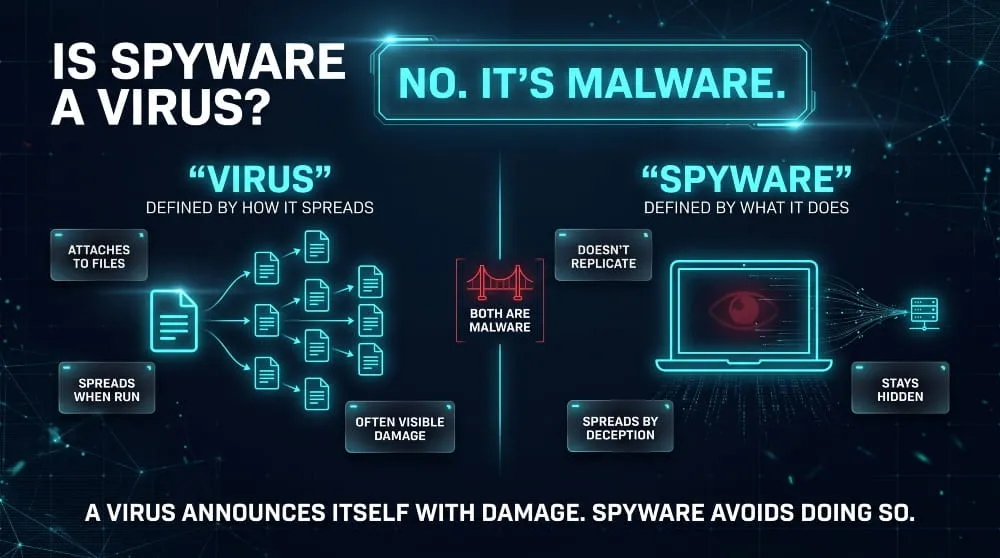
Spyware Is Not Technically a Virus
A virus is a program that replicates by attaching itself to other files or programs and spreads when those files are run or shared. Spyware usually does not replicate at all. It arrives through deception, such as a bundled download or a fake app, and then stays on the infected device.
Why People Say “Spyware Virus”
People say “spyware virus” because “virus” became everyday shorthand for any computer infection, and because security products have long been sold as “antivirus.” The phrase is common but imprecise. Spyware is better described as malware.
Spyware vs. Virus: Side-by-Side
A virus needs a host file and a user action to spread, and its damage is often visible, such as corrupted files or crashing programs. Spyware doesn’t need a host file, spreads through tricks rather than replication, and tries to stay invisible. A virus announces itself through damage, while spyware avoids doing so.
Spyware vs. Worm
A worm is self-replicating malware that spreads across networks on its own, without user action or a host file. Spyware does not spread itself this way. However, the two can combine when a worm delivers a spyware payload.
Spyware vs. Adware
Spyware and adware are separate categories that overlap. Adware aims to show ads, while spyware aims to surveil you covertly, and adware becomes spyware when it secretly tracks you.
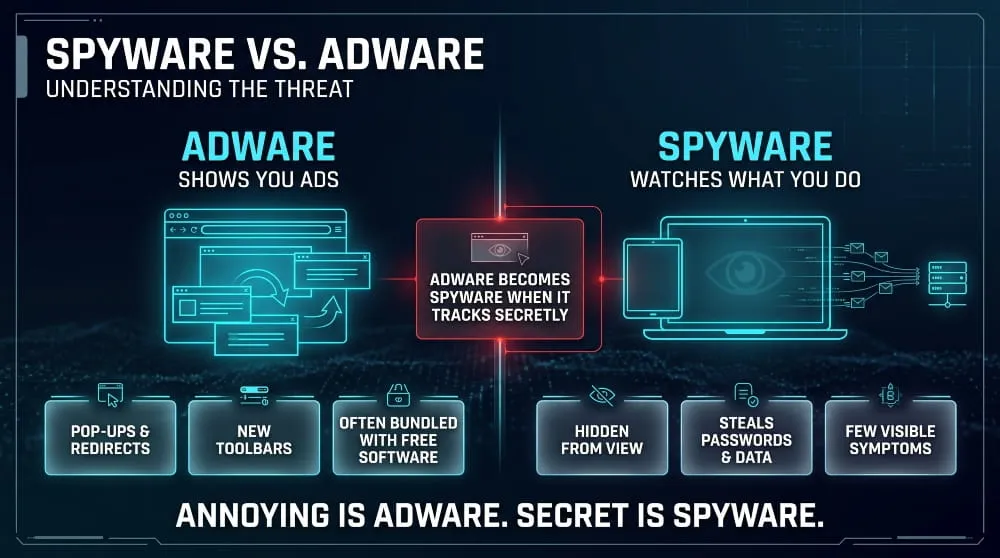
What Is Adware?
Adware is software that displays unwanted ads, often as pop-ups, banners, or injected links in a browser. It frequently arrives bundled with free software. In 2017, Check Point reported that Fireball, a browser hijacker that pushed ads and tracked users, had infected about 250 million computers.
“Spyware Is Also Known as Adware”: True or False?
Mostly false. Spyware and adware are different categories, even though some security vendors group them and some programs behave like both. Adware focuses on advertising, and spyware focuses on collecting information without consent. A quiz that says spyware is “also known as adware” is oversimplifying.
When Adware Becomes Spyware
Adware becomes spyware when it records browsing habits, searches, or personal data without clear disclosure and sends it to a third party. Plain ad display is annoying, while hidden profiling is surveillance, and many aggressive adware programs do both.
How to Tell Them Apart
Adware shows itself through pop-ups, redirects, new toolbars, and a changed homepage. Spyware shows few symptoms beyond unexplained battery drain, data use, or account activity. If you see constant ads, suspect adware; if your accounts show activity you didn’t start, suspect spyware.
Spyware vs. Trojan
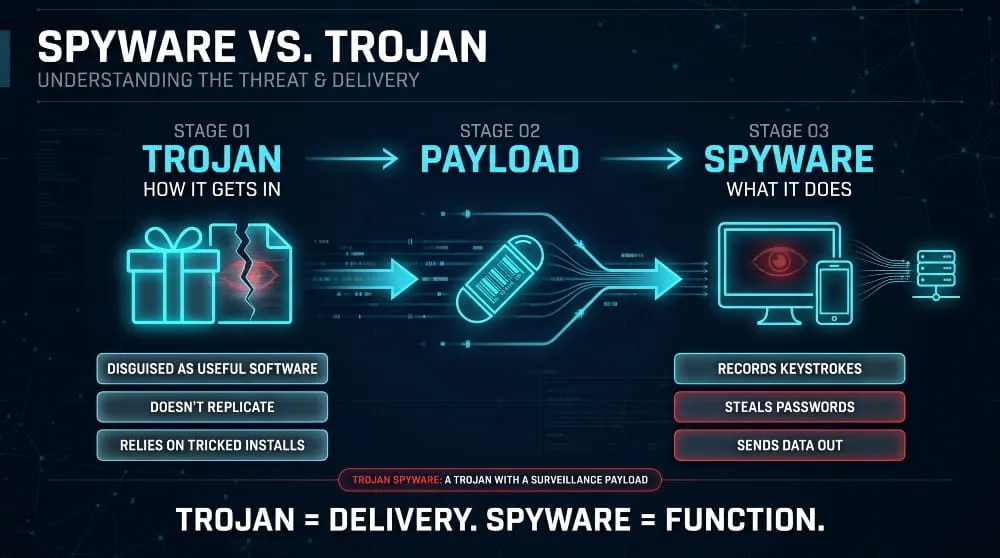
A trojan describes how malware gets onto your device, and spyware describes what it does once it is there. They are not opposites, and a single program can be both.
Trojan = Delivery Method, Spyware = Function
A trojan is malware disguised as something legitimate, such as a free tool, a cracked program, or a document, and it does not replicate itself. Spyware is defined by its behavior of collecting data. One term answers “how did it get in,” and the other answers “what does it do.”
Trojan Spyware: When They Combine
Trojan spyware is a trojan whose payload is surveillance. Agent Tesla, a long-running keylogger and information stealer, is typically delivered through phishing attachments disguised as invoices or documents. The disguise tricks the user into installing it, and the payload then steals credentials.
Spyware vs. Ransomware (and Other Threats)
Spyware watches quietly, while ransomware makes itself known. They have different goals and behave differently, though attackers often use one to enable the other.
Spyware vs. Ransomware
Ransomware encrypts or locks your files and demands payment, so victims know within seconds. Spyware steals silently and may go unnoticed for months. Attackers sometimes use spyware-style tools first to harvest credentials, then deploy ransomware once they have access. You may see “threatware” used as a loose catch-all in quizzes and marketing, but it is not a standard security term.
Where Keyloggers, Rootkits and Phishing Fit
A keylogger is spyware that records keystrokes. A rootkit is software that hides other malware, helping spyware stay invisible. Phishing isn’t malware; it’s a social engineering technique that tricks people into revealing information or running malware, and it is one of the most common ways spyware is delivered.
Malware Types Compared Side by Side
The table below compares the main malware types by what they do, how they spread, a well-known example, and the main sign that points to them.
Virus, Worm, Trojan, Spyware, Adware, Ransomware, Rootkit and Keylogger Compared
| Type | What It Does | How It Spreads | Example | Main Sign |
|---|---|---|---|---|
| Virus | Infects files and programs | Attaches to files, spreads when they run | ILOVEYOU (2000) | Corrupted files, crashes |
| Worm | Spreads itself across networks | Self-propagates with no user action | Morris worm (1988) | Network slowdown |
| Trojan | Hides a malicious function in a legitimate-looking program | Tricked installs, phishing | Zeus | Unexpected behavior after install |
| Spyware | Secretly collects data and sends it out | Bundled software, fake apps, phishing, exploits | Pegasus | Battery drain, odd account activity |
| Adware | Displays ads and may track browsing | Bundled with free software | Fireball | Pop-ups, redirects, new toolbars |
| Ransomware | Locks or encrypts files and demands payment | Phishing, exploits, stolen access | WannaCry | Ransom note, locked files |
| Rootkit | Hides other malware from detection | Installed alongside other malware | Sony BMG rootkit (2005) | Security tools disabled |
| Keylogger | Records every keystroke | Trojans, phishing, physical access | Agent Tesla | Stolen passwords, unexplained logins |
Can One Program Be More Than One Type?
Yes. Categories describe behavior so that a single threat can combine several. WannaCry in 2017 was ransomware that spread like a worm across networks, infecting more than 200,000 computers in about 150 countries, and a Trojan can deliver spyware as its payload.
Official Definitions (CISA and NIST Wording)
Government security guidance defines malware as software intended to cause unauthorized harm to a system’s confidentiality, integrity, or availability. The wording below is paraphrased from the definitions published by NIST and CISA.
Malware, Virus, Worm, Trojan, Ransomware and Spyware Defined
Malware is software designed to perform unauthorized actions that harm a system. A virus replicates itself and infects other computers, while a worm self-replicates and spreads across networks on its own. A Trojan appears useful but hides a malicious function, and ransomware encrypts data and demands payment. Spyware is software secretly installed to gather information on people or organizations without their knowledge.
Phishing, Social Engineering and DDoS: How They Differ
Phishing and social engineering manipulate people into revealing information or taking harmful actions, while a DDoS attack floods a target with traffic to knock it offline. None of the three is malware itself, though phishing often delivers malware, and DDoS attacks often launch from networks of infected devices.
Examples of Spyware, Viruses, Worms and Adware
Real examples make the categories easier to tell apart. The ones below are well documented and span several decades.
Spyware Examples
Keyloggers such as Agent Tesla, infostealers such as Lumma, RedLine and Vidar, and mercenary spyware such as Pegasus are the main modern examples. DeXpose covers the credential-stealing families in its guide to infostealer malware.
Famous Viruses and Worms
The Morris worm of 1988 was one of the first internet worms, and the ILOVEYOU worm spread through email in 2000, with damage estimates in the billions of dollars. WannaCry in 2017 combined ransomware with worm-style spreading.
Adware Examples
Fireball is the best-known recent example, and earlier programs such as Gator tracked behavior and displayed ads in the early 2000s. On phones, adware often arrives inside free apps that show aggressive ads or push full-screen pop-ups.
Signs of Infection: Spyware vs. Virus vs. Adware
The signs differ because the behavior differs. Visible disruption points to a virus or adware, and quiet anomalies point to spyware.
Spyware Symptoms
Spyware symptoms are subtle: fast battery drain, high data use, a device that runs warm or slow, unknown apps or permissions, and account logins you did not make. Many people notice only after money or accounts are affected.
Virus and Worm Symptoms
Viruses and worms tend to be noisy: files that vanish or become corrupted, programs that crash, unexpected network slowdowns, and emails sent from your account without your knowledge. They are more likely to cause visible damage.
Adware Symptoms
Adware shows up as constant pop-ups, ads where they shouldn’t be, redirected searches, a changed homepage, and unfamiliar browser toolbars or extensions.
How to Check for Spyware and Viruses at the Same Time
Run a full scan with a reputable security product, review startup programs and browser extensions, and check which apps hold unusual permissions. A single full scan checks for viruses, spyware, and adware because modern security software covers all of them.
Antivirus vs. Anti-Malware vs. Anti-Spyware: Do You Need All Three?
No. Modern security software combines antivirus, anti-malware, and anti-spyware features, so one reputable, built-in or installed product usually covers all three.
What Each Tool Claims to Cover
Antivirus originally targeted viruses, anti-spyware targeted spyware and adware, and anti-malware was a broader label for everything else. The names reflect marketing history more than separate technology today.
Why Modern Security Suites Combine Them
Threats overlap, and a single threat can be a Trojan, a spyware payload, and a rootkit at once, so separate tools leave gaps. Combined suites detect all of these through one engine and one set of updates.
Windows and Mac Built-In Protection
Windows Security, including Microsoft Defender Antivirus, protects against viruses, spyware, and other malware; Defender began in 2005 as a Microsoft anti-spyware tool. macOS includes XProtect and Gatekeeper, which block known malware and unsigned apps. For most people, built-in protection plus careful habits is enough.
How to Remove Spyware, Malware, Viruses and Adware (One Process That Works for All)
The same process works for spyware, malware, viruses, and adware: disconnect, restart in Safe Mode, uninstall suspicious software, run a full scan, update the system, and reset the device if the threat persists.
The Shared Removal Steps
- Disconnect from the internet so the malware cannot send data or receive commands.
- Restart in Safe Mode so the threat is less likely to run.
- Uninstall unfamiliar programs and apps.
- Run a full scan and an offline scan with a reputable security product.
- Install all system and browser updates.
- Change your passwords from a different, clean device.
Adware and Browser Hijackers: Extra Browser Cleanup
Adware and hijackers also need a browser cleanup. Remove extensions you didn’t install, reset browser settings to default, and turn off notification permissions for sites you don’t trust.
When to Reset the Device
Reset or reinstall the operating system when the threat returns after removal, when a rootkit hides it from scans, or after ransomware. Afterward, restore only personal files, since restoring a full system backup can bring the infection back.
How to Protect Against Spyware, Malware, Viruses and Adware
You can protect against all four with the same habits: keep software updated, download only from official sources, be careful with email and links, and use layered protection.
Updates and Patching
Install operating system, browser, and app updates promptly. Most worms, viruses, and spyware exploits target known flaws that updates already fix.
Safe Downloads and Email Habits
Install software only from official stores and vendor sites, avoid cracked programs, and do not open unexpected attachments or links. These habits block the delivery routes used by trojans, spyware, and adware.
Layered Protection
Combine built-in security tools, a tidy set of browser extensions, and regular offline backups. Backups matter most for ransomware, since a clean backup is the only dependable way to recover without paying.
What Happens to Data Stolen by Malware and Spyware?
Spyware and other malware steal data that the operator uses or sells, and much of it ends up on the dark web. Flashpoint estimated that infostealers harvested 1.7 billion credentials from infected devices in the first half of 2026.
How Stolen Data Reaches the Dark Web
Infostealers and spyware package passwords, cookies, and device details into logs. Criminal marketplaces sell those logs, and forums and Telegram channels share them, then use them for account takeover, fraud, and as an entry point for larger attacks such as ransomware.
How to Check Whether Your Credentials Were Exposed
After cleaning a device, check whether your details are already circulating. DeXpose’s Free Darkweb Report gives an instant exposure report covering dark web markets, malware logs, and public breaches, and the Email Data Breach Scan shows whether your email address appears in known breaches. Change any password that turns up.
Continuous Monitoring for Organizations
For companies, one infected device can expose company logins and open the way to internal systems. DeXpose dark web monitoring and breached credentials monitoring alert security teams when company credentials appear in criminal sources, so accounts can be reset before they are abused.
Frequently Asked Questions (FAQ)
Is spyware a virus?
No. A virus replicates by attaching itself to other files, while spyware is malware designed to collect information secretly. Both fall under the broader term malware.
Is spyware malware?
Yes. Spyware is a type of malware designed to secretly gather information about a person or organization and send it to someone else.
Is adware the same as spyware?
No. Adware displays advertising, while spyware covertly collects information. Adware that secretly tracks you and reports your data to a third party also qualifies as spyware.
What is the difference between malware and spyware?
Malware is an umbrella term for all malicious software, and spyware is one type that quietly steals information. All spyware is malware, but not all malware is spyware.
Spyware, Trojan horses, worms, and viruses are examples of what?
Malware, short for malicious software. It is the umbrella term for spyware, trojans, worms, viruses, adware, ransomware, and other harmful programs.
Can I remove spyware and viruses with the same tool?
Yes. A reputable security product with a full scan detects and removes viruses, spyware, and adware, and an offline scan helps catch threats that hide while the system runs. If the infection persists, reset the device.
Article Link: Spyware vs. Malware vs. Virus vs. Adware | The Difference