Yes, phones can get spyware. Spyware on a phone is hidden software that secretly collects your messages, calls, location, photos, and passwords and sends them to someone else; you can check for it in your settings, remove it by revoking access, deleting the app, or resetting the device, and prevent it with updates and careful installs. This guide covers iPhone, iPad, and Android, from everyday stalkerware to government-grade attacks like Pegasus.
Introduction to Malware Binary Triage (IMBT) Course
Looking to level up your skills? Get 10% off using coupon code: MWNEWS10 for any flavor.
Enroll Now and Save 10%: Coupon Code MWNEWS10
Note: Affiliate link – your enrollment helps support this platform at no extra cost to you.
What Is Spyware on a Phone?
Spyware on a phone is software installed without your informed consent that monitors your activity and reports it to a third party. It differs from normal apps because it hides, and it takes access that no legitimate function requires.
Spyware on Phone: Definition in Simple Words
Phone spyware is a secret program that records activity on your device and sends it to someone else. That person may be a criminal after your bank login, a partner trying to control you, or a customer of a surveillance vendor.
What Spyware Can See and Do on Your Phone
Depending on its access, spyware can read texts and chat apps, log calls, track GPS location, copy photos and files, capture passwords and screens, and switch on the camera or microphone. Consumer spyware is usually limited by the permissions you granted, while advanced spyware can reach almost everything on the device.
Mobile Spyware vs. Stalkerware vs. Mercenary Spyware
Mobile spyware is the broad category. Stalkerware is spyware installed by someone in your life, often a partner, and Kaspersky counted 31,031 mobile users affected by it worldwide in 2023. Private vendors build mercenary spyware for governments; it costs a fortune and targets few people.
Can iPhone, iPad and Android Phones Actually Get Spyware?
Yes, all three can. Android is easier to infect with everyday spyware because users can sideload apps from outside the store, while iPhones and iPads are mainly hit by expensive, exploit-based attacks. Neither platform is immune, and spyware treats iPads like iPhones.
How Does Spyware Get on a Phone?
Spyware reaches a phone through physical access, malicious links and fake apps, booby-trapped messages, or zero-click exploits that need no action from you. Most real-world infections involve physical access or tricking a user into installing something.
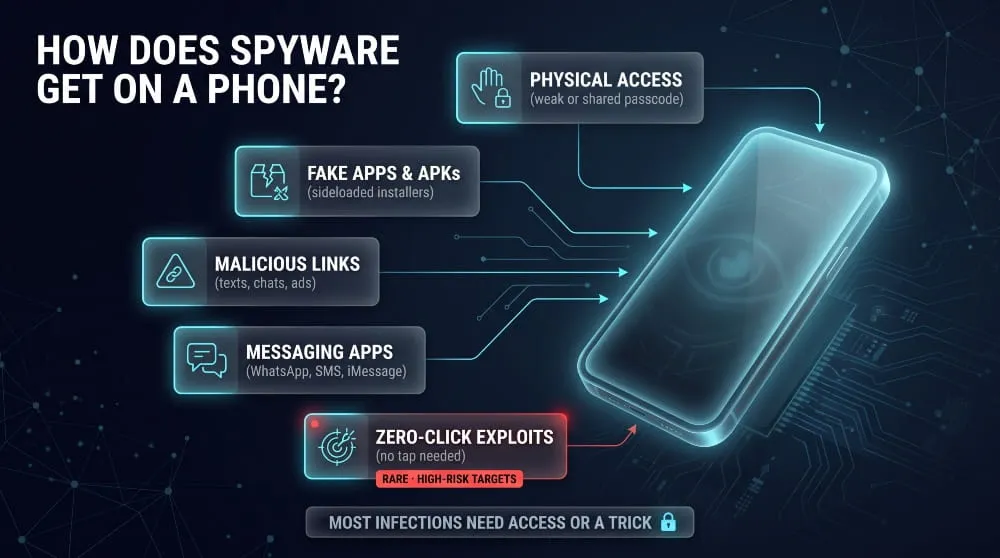
Physical Access and Weak Screen Locks
The most common route is simple: someone who knows or guesses your passcode can install an app or change a setting in a few minutes. A strong passcode that you don’t share with anyone, and a locked screen when the phone is out of your hands, block this route.
Malicious Links, Fake Apps and Sideloaded APKs
Fake apps impersonate popular services, and links in texts, chats, and ads lead to sideloaded installers. Zimperium documented the ClayRat Android campaign in 2025 with more than 600 samples in three months, spread through Telegram channels and phishing sites that imitated apps like WhatsApp, TikTok, and YouTube. Many of these also act as infostealers.
Spyware Through Messaging Apps (WhatsApp, SMS, iMessage)
Messaging apps serve as a delivery channel in two ways: bad links that trick you into installing something, and specially crafted messages or files that exploit an app flaw. In 2025, WhatsApp said it disrupted a campaign using Paragon’s Graphite spyware against around 90 users, including journalists.
Zero-Click Spyware: Infection With No Tap
Zero-click spyware infects a phone without any tap, link, or install. A 2021 investigation by Amnesty International and Forbidden Stories examined a leaked list of more than 50,000 phone numbers linked to NSO Group’s Pegasus customers. These attacks are costly and target a small number of high-risk people.
Can Someone Install Spyware With Just Your Phone Number?
A phone number alone does not let an ordinary person install spyware on your phone. Attackers need a way in, such as a link you open, a message exploit, your account credentials, or physical access. Only advanced zero-click tools can work from a number or account identifier.
Can a New, Refurbished or Budget Phone Come With Spyware?
It is rare on mainstream phones from reputable sellers, but researchers have found malware preinstalled in the firmware of some cheap, off-brand Android devices. A refurbished phone can also carry software from its previous owner. Buy from trusted sellers, install updates, and factory reset a used device before setting it up.
Can Spyware Transfer to a New Phone Through a Backup?
Spyware rarely transfers on its own, but a restored backup can bring back malicious profiles, settings, or apps. When you move to a new phone, set it up as new and restore only photos, contacts, and files, not a full system backup.
Signs Your Phone Has Spyware
The main signs of spyware on a phone are fast battery drain, unexplained data use, heat while idle, unfamiliar apps or permissions, and a camera or microphone that activates by itself. One sign is a clue, and several together are a warning.
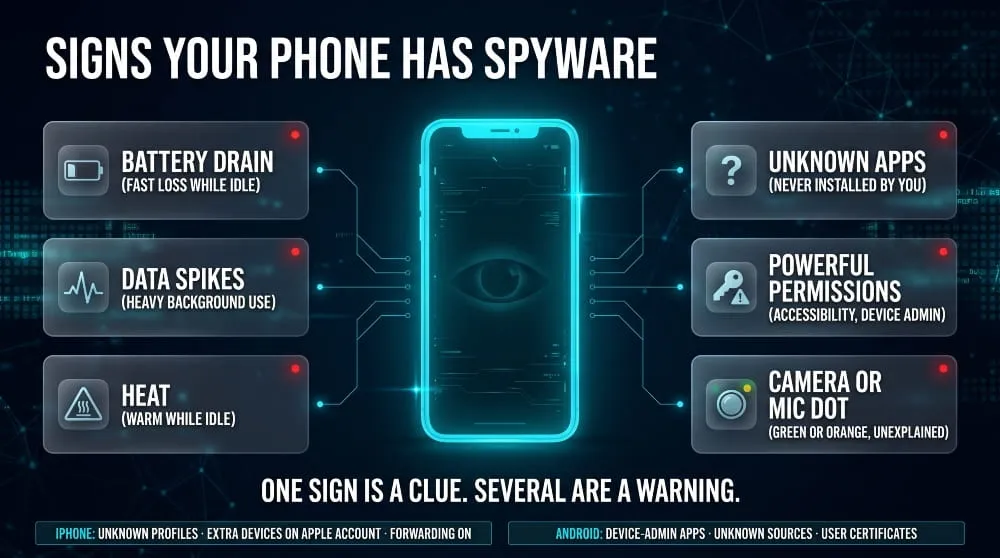
Battery, Heat and Data Usage Red Flags
Spyware works in the background, so it uses power and mobile data. Check battery and data usage lists for apps consuming far more than their purpose justifies, and treat a warm, fast-draining idle phone as a reason to look closer.
Strange Apps, Permissions and Settings
Look for apps you didn’t install, apps with blank or generic system-style names, and unexpected access to accessibility, device administration, notifications, or SMS. A flashlight or wallpaper app holding any of these has no good reason to.
Camera and Microphone Indicators
iPhones show a green dot when the camera is in use and an orange dot for the microphone; recent Android versions also show indicators and a privacy dashboard listing which apps used them. An indicator you cannot explain deserves attention, though researchers have reported advanced spyware that tries to suppress such indicators.
Signs on iPhone vs. Signs on Android
On iPhone, look for an unfamiliar configuration profile, unknown devices on your Apple account, and forwarding turned on in Messages or Phone settings. On Android, watch for unknown device-admin apps, apps installed from unknown sources, and user-added security certificates.
Spyware or Just a Bug?
Battery drain, heat, and slowdowns often come from a bad update, a heavy app, or an aging battery. Spyware is more likely when symptoms start suddenly, coincide with an unknown app or setting, or are paired with account logins you did not make.
How to Check an iPhone for Spyware
To check an iPhone for spyware, review battery and data usage, the App Privacy Report, installed profiles, forwarding settings, and the devices signed in to your Apple account, then update iOS. iOS does not allow apps to scan other apps, so manual review matters.
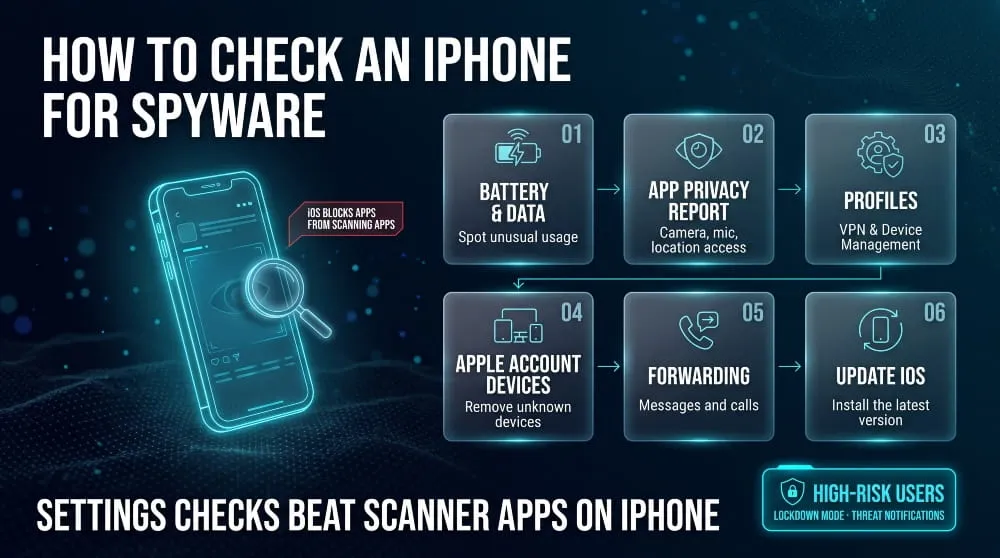
Review Battery, Data Usage, and Privacy Report
Open Settings, then Battery and Cellular to spot apps with unusual usage. Then turn on App Privacy Report under Privacy & Security to see which apps accessed your camera, microphone, location, and contacts, and which domains they contacted.
Check Profiles, VPN and Device Management Settings
Go to Settings, General, VPN & Device Management. Investigate any configuration profile you don’t recognize, or a work profile on a personal phone, because profiles can route traffic or restrict settings.
Check Apple Account Devices, Message Forwarding, and Call Forwarding
Open Settings and tap your name to see every device signed in to your Apple account, then remove any you don’t own. Also check Messages for Text Message Forwarding and Phone for Call Forwarding, since forwarding quietly copies your communications elsewhere.
Review Unknown Apps and App Permissions
Scroll through your app list and the permission lists under Privacy & Security. Delete apps you don’t remember installing, and revoke camera, microphone, location, and contacts access for apps that don’t need it.
Apple Threat Notifications: What the Alert Means
An Apple threat notification is a high-confidence warning that mercenary spyware may have targeted you individually. Apple sent a new round to users in 110 countries on 13 August 2026 and says it has notified users in more than 150 countries since 2021. Alerts appear on your iPhone, by email, and on your Apple account page, and you should take them seriously.
Safety Check and Lockdown Mode
Safety Check, under Privacy & Security, lets you see and limit what you share with people and apps, which helps if a partner has had access. Lockdown Mode sharply reduces the attack surface for high-risk users, and Apple told TechCrunch in March 2026 it knew of no successful mercenary spyware attack against a device with Lockdown Mode enabled.
Can You Scan an iPhone for Spyware?
Not like you scan a computer. iOS sandboxing stops apps from inspecting other apps or system files, so scanner apps can only check limited signals such as network behavior or a backup. For iPhones, updating iOS and reviewing settings is more reliable than a scan.
Spyware on iPad: Same Checks, Same Fixes
iPads run the same iOS-family software, so the same checks apply: review profiles, Apple account devices, app permissions, and updates. Anything that can happen to an iPhone through a software flaw can generally happen to an iPad.
How to Check an Android Phone for Spyware
To check an Android phone for spyware, run Google Play Protect, review installed apps, and audit accessibility, device-admin, notification, and unknown-source access. Menu names vary by manufacturer, but the checks are the same.
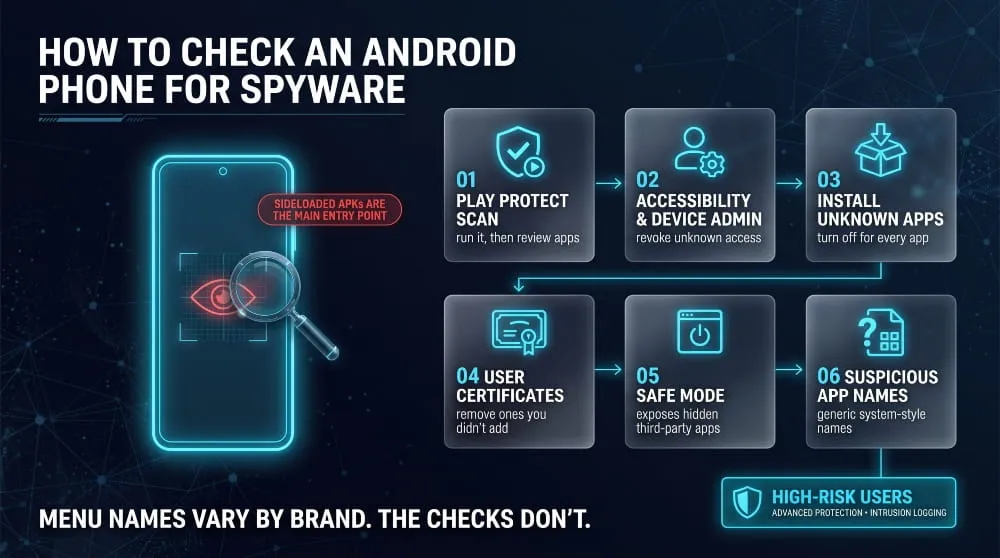
Run Play Protect and Review Installed Apps
Open the Play Store, tap your profile, then Play Protect, and run a scan. Then review the full list of installed apps for anything unfamiliar, including apps with generic names or no icon.
Audit Accessibility, Device Admin, and Notification Access
Check Accessibility, Device admin apps, and Notification access in Settings. These permissions let an app read the screen, resist being uninstalled, and intercept messages, so only trusted apps should have them.
Check “Install Unknown Apps” and Special App Access
Under Special app access, open Install unknown apps. If you allow an app to install other apps, especially a browser or file manager you rarely use, it may have been used to sideload spyware.
Look for Spyware in Trusted Credentials and User Certificates
In the security or encryption settings, open Trusted Credentials and view the User tab. User-installed certificates you didn’t add can let someone intercept encrypted traffic, so any certificate you cannot explain is a real red flag.
Use Safe Mode to Expose Hidden Apps
Boot into Safe Mode by long-pressing the power-off option. Third-party apps are disabled, so if a suspicious app stops running or appears in your app list, delete it.
Spyware App Names and File Names to Watch For
Spyware often hides behind generic names like “System Service,” “Sync,” “Update,” or “Wi-Fi,” or uses no icon at all. If a name mimics a system component but appears in your downloaded apps list, or asks for permissions a system component wouldn’t need, it deserves a closer look.
Android’s Newer Intrusion Logging and Advanced Protection
Google announced Intrusion Logging on 12 May 2026, an opt-in forensic feature inside Android’s Advanced Protection mode, developed with Amnesty International. It requires Android 16 or newer and a linked Google account, and it’s rolling out first to Pixel phones. It stores records that investigators can review for signs of compromise.
Do Secret Codes Detect Spyware?
No. Dialer codes like *#21# do not detect spyware. They show whether call forwarding is active, which can help spot one type of surveillance, and results vary by carrier.
What iPhone Codes to Check for Spyware Actually Do
Codes such as *#21# query your carrier about call, data and other forwarding status. They cannot see installed apps or system-level compromise. On an iPhone, the Call Forwarding setting under Phone shows the same information more reliably.
Android Codes: What They Reveal and What They Miss
On Android, the same forwarding codes work on many networks, and a code such as ##002# is widely used to cancel all forwarding. These reveal call diversions but miss spyware that reads messages, tracks location, or records audio.
What to Check Instead
Check call forwarding and text forwarding in settings, review linked devices in your messaging apps, and review your account login history. Those checks reveal more than any code.
Is It Spyware? System Apps and Features That Look Suspicious
Most unfamiliar-looking items on a phone are legitimate system components. A real system component comes from the manufacturer or operating system maker, appears on your device’sr device’s stock, and doesn’t ask for unusual permissions.
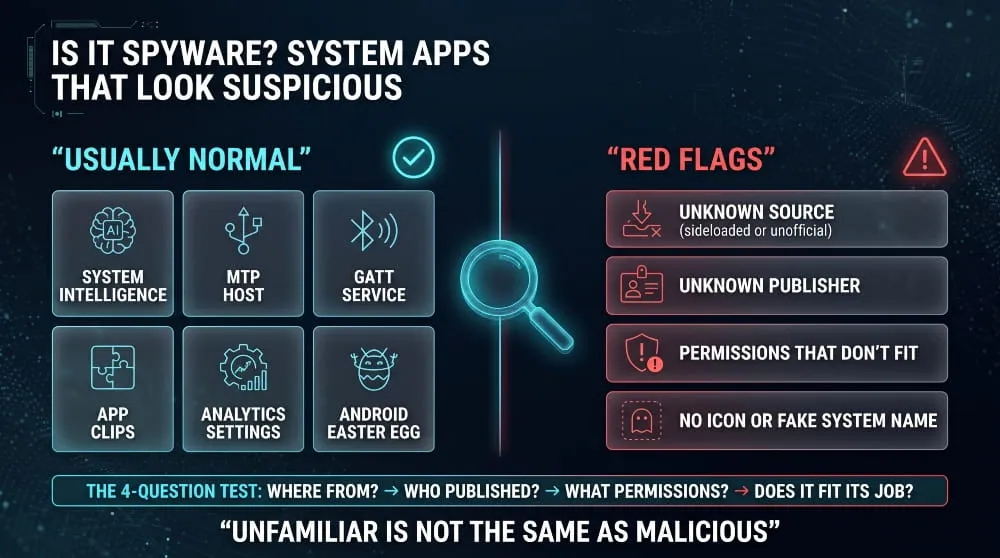
Android System Intelligence, SafetyCore and WebView
Android System Intelligence powers on-device features such as smart suggestions and captions. Android System SafetyCore is a Google component used for on-device content classification, and WebView renders web content inside apps. All three are normal parts of Android, though SafetyCore’s silent installation in 2025 drew complaints.
MTP Host, GATT Service, Companion Device Manager and Samsung Services
MTP Host handles USB file transfers, the GATT service supports Bluetooth Low Energy connections, and Companion Device Manager pairs accessories such as watches. Services named SKMS agent or KLMS agent on Samsung phones are generally tied to the manufacturer’s security and licensing components. They are not spyware by default, but confirm the app’s source if it appears elsewhere.
Config APK, Easter Eggs and Trusted Credentials
Configuration packages are small system or carrier files that apply settings, and the hidden Easter egg in Android’s version screen is a harmless game. Trusted credentials are different: system certificates are normal, but unfamiliar user certificates are worth removing.
iPhone App Clips, Analytics and Safari
App Clips are small, temporary parts of apps you can launch without a full install. Analytics & Improvements only shares data with Apple if you opted in, and you can switch it off. Safari showing in battery or data lists is normal, since links and web views route through it.
Chargers, Cables and Accessories
Malicious chargers and cables exist as demonstrated research tools, but real-world cases are rare. Using your own charger, or a data-blocking adapter on public USB ports, removes the risk at little cost.
A 4-Question Test for Any Unfamiliar App
Ask where it came from, who published it, what permissions it holds, and whether those permissions fit its purpose. An app from an official store, with a known publisher and reasonable permissions, is almost always fine. An app that fails two or more of these questions should go.
Pegasus and Other Mercenary Spyware on iPhone and Android
Mercenary spyware, such as Pegasus, is professional surveillance software sold to governments and used against journalists, activists, lawyers, and officials. It is rare, expensive, and usually delivered through exploits, so most people are far more likely to face stalkerware or malicious apps.
What Pegasus Is and Who It Targets
Pegasus is spyware developed by Israel’s NSO Group that can take over iPhones and Android phones, often through zero-click attacks. It has been documented against journalists and civil society figures, and Citizen Lab reported in July 2026 that a former member of the European Parliament had been repeatedly infected.
Predator, Graphite, LANDFALL and Recent Phone Spyware Campaigns
Predator comes from the Intellexa group, and Graphite from Paragon Solutions. Palo Alto Networks documented LANDFALL, a commercial-grade Android spyware family that targeted Samsung Galaxy phones through booby-trapped image files reportedly shared over WhatsApp and stayed active for close to a year before the flaw was patched.
In March 2026, Google, iVerify, and Lookout disclosed the DarkSword exploit kit on iPhone. It infected devices running iOS 18.4 through 18.6.2 when they visited malicious websites, and iVerify estimated that about 221 million iPhones were still on vulnerable versions at the time. Apple has since released fixes.
How to Detect Pegasus on iPhone and Android
Detecting Pegasus needs forensic tools, not a settings review. Amnesty International’s Security Lab publishes the Mobile Verification Toolkit, which checks a device backup for known indicators of compromise, and Amnesty also maintains AndroidQF for Android. People who suspect they are targeted should contact a digital security helpline.
What Apple and Google Threat Notifications Mean
Apple threat notifications are high-confidence alerts, and Apple urges recipients to seek expert help and consider Lockdown Mode. On Android, Google’s Advanced Protection mode and Intrusion Logging provide stronger protection and forensic records for high-risk users. Neither is a general-purpose scanner.
CISA and NCSC Guidance for High-Risk Users
CISA has published mobile security guidance for highly targeted individuals, covering steps such as using end-to-end encrypted messaging, strong authentication that does not rely on SMS, and keeping devices updated. National agencies such as the UK’s NCSC publish similar mobile guidance.
Do Phones Ship With “Israeli” or Other Government Spyware?
No public evidence shows mainstream phones ship with government spyware from the factory. Documented mercenary spyware reaches phones afterward through exploits, links, and malicious apps. Viral claims usually trace back to misunderstood system components, such as the services covered above.
How to Remove Spyware From Your Phone
To remove spyware from a phone, update the operating system, delete unknown apps and profiles, revoke suspicious permissions, run a scan on Android, change your passwords from a different device, and factory reset if symptoms continue.
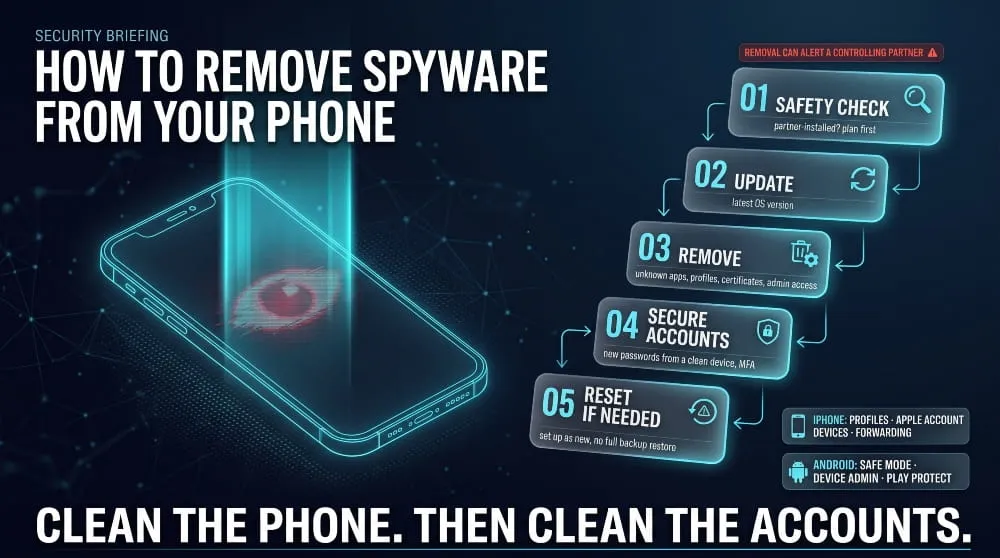
Before You Remove It: The Safety Check
If you suspect that a partner or someone close to you installed the spyware, removing it can alert them and may increase risk. Consider contacting a domestic violence support organization first, and use a device the person cannot access to look for help.
How to Remove Spyware From an iPhone
- Update iOS to the latest version.
- Delete unknown apps and remove unknown profiles under VPN & Device Management.
- Remove unknown devices from your Apple account and change your Apple account password.
- Turn off any message and call forwarding you didn’t set up.
- If symptoms persist, back up photos and contacts, erase the iPhone, and set it up as new.
How to Remove Spyware From Android
- Restart in Safe Mode to turn off third-party apps.
- Revoke device admin and accessibility access for suspicious apps, then uninstall them.
- Remove unfamiliar user certificates and turn off Install unknown apps for every app.
- Run a Play Protect scan and install pending updates.
- If the app returns or won’t remove, back up essentials and factory reset the phone.
Does a Factory Reset Remove Spyware?
A factory reset removes most consumer spyware by wiping apps, settings, and profiles, but it doesn’t guarantee protection against advanced firmware malware. Set the phone up as new instead of restoring a full backup, because a backup can restore the problem.
Does Updating iOS or Android Remove Spyware?
Updates close the vulnerabilities spyware uses and can break exploit-based infections, but they do not reliably remove an installed app or profile. Some iPhone malware, like the DarkSword kit, is non-persistent and disappears on restart, though the data it stole stays stolen.
Will a Backup or a New Phone Bring It Back?
Spyware usually does not follow you to a new phone, but a restored backup can bring back malicious settings or profiles. The safest approach is to restore only your photos, contacts, and files.
After Removal: Passwords, MFA, and Account Checks
Treat everything on the phone as exposed. Change passwords from a clean device, starting with email, then banking and social accounts. Turn on multi-factor authentication, review account login history, and tell your bank if financial details may have been captured.
Do You Need Anti-Spyware or Antivirus on Your Phone?
On Android, built-in Play Protect plus careful installs cover most people, and a reputable security app adds some extra checks. On iPhone, iOS design limits anti-spyware apps, so updates and settings reviews matter more.
What iOS Allows and Why Scanner Apps Are Limited
Because iOS keeps apps isolated, an anti-spyware app on iPhone cannot examine other apps or system files. It can flag risky network connections, warn about unsafe links, or check a backup, which helps but isn’t a complete scan.
What Play Protect and Third-Party Android Scanners Can and Cannot Find
Play Protect and reputable scanners reliably find known malicious apps and common stalkerware. They are far less likely to catch advanced commercial spyware designed to evade standard detection.
Mobile Threat Defense for Businesses
Traditional endpoint tools were built for laptops and often have little visibility into phones. Organizations that handle sensitive data should use mobile device management and mobile threat defense for work phones, and enforce rapid updates.
How to Protect Your Phone From Spyware
You can protect your phone from spyware by updating promptly, installing apps only from official stores, limiting permissions, using a strong screen lock, and being careful with links and messages. High-risk users should add Lockdown Mode or Advanced Protection.
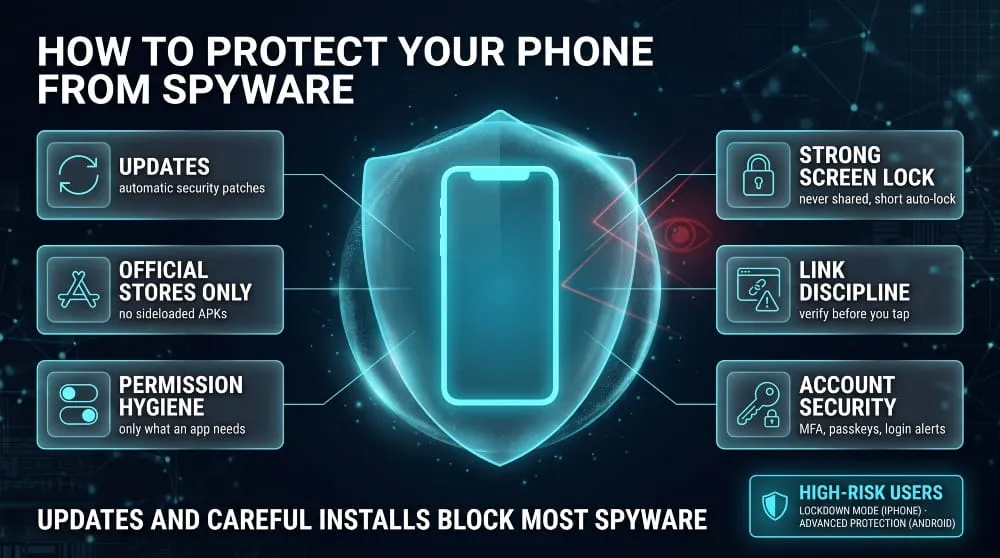
Updates and Automatic Security Patches
Turn on automatic updates. DarkSword worked only against specific older iOS versions, and patched versions closed the hole, which shows that updating is one of your strongest defenses.
Lockdown Mode (iPhone) and Advanced Protection (Android)
Lockdown Mode on iPhone and Advanced Protection on Android restrict features that attackers rely on, at the cost of some convenience. They are designed for journalists, activists, and others at elevated risk.
Safe Installs: Official Stores Only, No Sideloaded APKs
Install apps only from the official store, and avoid APK files in messages, chat channels, or on websites. Sideloading is the main way consumer-grade Android spyware gets in.
Permission Hygiene and a Strong Screen Lock
Grant only the permissions an app needs, review them every few months, and use a passcode only you know. Set a short auto-lock time so a briefly unattended phone does not become an open door.
Message and Link Discipline
Don’t open unexpected links or attachments, even from contacts, because attackers can hijack accounts and use them to spread malicious links. When in doubt, confirm with the sender through a different channel.
Account Security: MFA, Passkeys and Login Alerts
Use multi-factor authentication or passkeys and turn on login alerts so a stolen password isn’t enough to take over an account. This limits the damage if spyware does capture a login.
Someone Installed Spyware on My Phone: What to Do
If someone installed spyware on your phone, protect your safety first, secure your accounts from a different device, then remove the software when it is safe to do so. Removing it in a way that alerts a controlling partner can be dangerous.
Protect Your Safety First
If you fear for your safety, contact a local domestic violence service or a national hotline before you change anything. They can help you plan a safe sequence, and many specialize in technology-facilitated abuse.
Securing Accounts From a Different Device
Use a phone or computer the other person has never touched to change your email, Apple or Google account, banking, and social passwords, then enable multi-factor authentication. Spyware on the old phone can capture anything you type.
Apple Safety Check and Google Security Checkup
Apple’s Safety Check shows and resets what you share with people and apps on an iPhone. Google’s Security Checkup reviews signed-in devices and account access, and both help you cut off a partner’s access.
Can You Find Out Who Installed It?
Sometimes. Installation dates, the account the app is linked to, and which devices are signed in can point to who had access, but proving it usually needs a forensic review. Keep screenshots and notes before removing anything.
Who Can Check My Phone for Spyware
Mobile carriers and phone repair shops generally cannot reliably confirm spyware. Better options include a digital security helpline like Access Now for high-risk users, or organizations in the Coalition Against Stalkerware and domestic violence services for stalkerware cases.
Is It Illegal to Put Spyware on Someone’s Phone?
Yes, in most countries it is illegal to secretly install spyware on another adult’s phone, even if you paid for the phone or share the household. This section is general information, not legal advice, and laws vary by location.
Laws on Covert Phone Monitoring
In the United States, covert monitoring can violate the federal Wiretap Act, the Stored Communications Act, and the Computer Fraud and Abuse Act, along with state laws. Other countries have comparable computer-misuse and privacy laws, and some actions can also lead to criminal harassment charges.
Employer Device Management vs. Illegal Spyware
Employers can generally manage company-owned phones with disclosed monitoring and device management software. The same tools become unlawful or unethical when installed secretly, used on personal devices without agreement, or used to capture private accounts.
Can Police or Governments Install Spyware on Your Phone?
Some governments and agencies use lawful interception and commercial spyware, with rules that vary widely by country. The use of commercial spyware has been controversial, and a 2023 US executive order restricted federal use of commercial spyware that poses security or human-rights risks.
What Happens to Data Stolen From Your Phone?
Phone spyware operators use stolen data directly or sell it, and a large share of stolen credentials ends up in criminal channels on the dark web. Cleaning your phone doesn’t recover data already taken.
How Phone Spyware Data Ends Up on the Dark Web
Infostealers and spyware bundle passwords, session cookies, messages, and device details into logs. Criminal marketplaces sell those logs, and underground forums and Telegram channels share them, then use them for account takeover and fraud.
How to Check Whether Your Credentials Were Exposed
After you clean your phone, check whether your details are already circulating. DeXpose’s Free Darkweb Report gives an instant exposure report covering dark web markets, malware logs, and public breaches, and the Email Data Breach Scan shows whether your email address appears in known breaches. Change any password that turns up.
Continuous Monitoring for Organizations
For companies, one infected employee phone can expose work logins and open the door to internal systems. DeXpose dark web monitoring and breached-credentials monitoring alert security teams when company credentials appear in criminal sources, so they can reset accounts before attackers abuse them.
Frequently Asked Questions (FAQ)
Can spyware be on my phone without me knowing?
Yes. Spyware is designed to stay hidden, and advanced tools leave almost no visible signs. Consumer spyware usually leaves traces such as odd permissions, battery drain, or unknown apps.
Can spyware record calls and messages?
Yes. Depending on its access, spyware can read texts and chat apps, log calls, and in some cases record call audio or ambient sound through the microphone.
Does airplane mode or turning the phone off stop spyware?
Turning the phone off stops active collection, and airplane mode stops live uploads, but persistent spyware resumes when the phone reconnects and may upload stored data later. Some advanced iPhone malware is non-persistent and disappears on restart.
Is Android more vulnerable to spyware than iPhone?
Android is easier to infect with everyday spyware because apps can be sideloaded, while iPhones face fewer consumer threats but remain targets for expensive exploit-based attacks. Updates and careful installs matter on both.
Can spyware be detected on an iPhone?
Yes, but not with a simple scan. Review profiles, app permissions, forwarding settings, and account devices to catch most consumer spyware, and use forensic tools to detect advanced attacks.
Does resetting my phone remove spyware?
A factory reset removes most spyware. Set the phone up as new and avoid restoring a full backup, since a backup can reintroduce malicious settings.
Do I need an app to find spyware?
Not always. Manual checks and built-in tools like Play Protect cover most cases on Android, and on iPhone, updates and settings reviews are more effective than any app.
Article Link: Spyware on Your Phone | How to Detect & Remove It (2026)