Key takeaways:
Introduction to Malware Binary Triage (IMBT) Course
Looking to level up your skills? Get 10% off using coupon code: MWNEWS10 for any flavor.
Enroll Now and Save 10%: Coupon Code MWNEWS10
Note: Affiliate link – your enrollment helps support this platform at no extra cost to you.
- Venmo scams trick you into sending money or sharing sensitive information via the payment app, Venmo.
- Common Venmo scams include accidental payments, fake buyers and sellers, QR codes, impersonation, phishing and overpayment scams.
- Most Venmo scams rely on getting you to act before you have time to think, so slowing down and verifying unexpected requests can help you avoid them.
Venmo scams usually look harmless because scammers use everyday interactions to convince you to send money or share sensitive personal information yourself.
Someone might send you a payment by mistake and ask you to return it. You send the money back, only to find out later that the original payment came from a stolen account or card and has been reversed.
In July 2026, a woman in New Jersey agreed to make a small Venmo donation to someone who said he was raising money for his basketball team. While she was making the payment, he took her phone and used her Venmo account to transfer $2,500 to another account.
If you’re worried about Venmo scams, here are the ones to watch for, the warning signs to look out for, and simple ways to protect your account.
1. The “Accidental” Payment Scam
In an accidental payment scam, a stranger sends money to your Venmo account and then says they made a mistake. They’ll ask (or pressure) you to send the money back, but the original payment may have come from a stolen account or card. If that payment gets reversed later, you’ll be left covering the amount you sent back.
H3: How to Avoid
If you get an unexpected payment, don’t send the money back yourself. Leave it in your account and contact Venmo through the app. The safest approach is to inform Venmo and let them handle the payment or conversation, rather than following instructions from someone you don’t know.
2. Fake Buyer or Seller / Business Account Upgrade Scam
In this scam, a fake buyer asks for your Venmo username and email address, then claims they’ve sent you a payment. You may receive a convincing email saying the payment is stuck because you need a business account.
The scammer will then ask you to pay an upgrade fee to release the money. Both the payment statement and the email are fake.
How to Avoid
Check your Venmo app before believing any payment notification. A real payment should appear in your account, so don’t rely on an email or screenshot from the buyer.
More importantly, be wary of anyone who asks you to pay a fee to receive money. A legitimate payment shouldn’t require you to send money first, so if someone asks you to pay to unlock funds, stop and contact Venmo through the app.
3. QR Code Scams
One type of QR code scam involves a scammer asking for your Venmo QR code to supposedly pay you for something. They’ll then use it for other social engineering attacks like targeted phishing campaigns and social media scams.
Alternatively, they can send you their own QR code and ask you to scan it to make a payment. That code can take you to a fake payment or login page designed to steal your information. In fact, the FTC recently warned about scammers placing fake QR codes over legitimate ones to send people to fraudulent payment pages.
How to Avoid
If someone asks for your QR code, only share it when you know who you’re dealing with. Also, check your Venmo app to confirm the payment.
And if someone sends you a QR code, check where it takes you before entering payment or login details. Even better, open Venmo yourself and make the payment from there instead.
You can also use a VPN to add another layer of protection when accessing your accounts on public Wi-Fi.
4. Fake Venmo Customer Support Scams
In a fake Venmo support scam, someone contacts you pretending to be a Venmo representative. They may claim there’s a problem with your account or a suspicious transaction and ask you to verify your identity. From there, they’ll try different pressure tactics to get your password or other sensitive information.
How to Avoid
If someone contacts you claiming to be Venmo support, don’t give them your password or verification code. Open the Venmo app yourself and contact support through the official channels there. Be especially careful if the person asks you to move money or share sensitive information to resolve an account issue.
5. Overpayment Scams
Here, a buyer sends you more money than you asked for and then points out the mistake. They’ll ask you to send the extra amount back, often before the original payment gets reversed. If the first payment came from a stolen account or card, you could end up sending your own money to the scammer.
How to Avoid
If someone overpays you, don’t feel like you have to send the extra money back right away, especially as a scammer will try to rush you before you have time to check the payment. First, check if the payment shows up in your Venmo account, then contact Venmo, or even better, tell them to contact Venmo for a payment reversal.
6. Phishing Links and Fake Login Pages
Phishing is a type of scam where someone pretends to be a person or company you trust to get you to hand over sensitive information. With Venmo, scammers may send a text or email that looks like it came from Venmo and includes a link to “verify” your account or fix a problem. The link leads to a fake login page that steals the information you enter.
How to Avoid
If you get a message about your Venmo account, don’t use the link it gives you. Open the Venmo app yourself and check your account there. If you do open a link, check the web address carefully before entering your login details, especially if the message is pushing you to act quickly.
Antivirus software can also help detect and block known phishing websites and malware before they get a chance to steal your information.
7. Impersonation Scams
Here, someone pretends to be a person or organization you trust. On Venmo, a scammer might pose as a friend, family member or customer support representative and ask you to send money or share account information. They may even use a familiar name or profile picture to make the request seem legitimate.
How to Avoid
If you get an unusual money request for money from someone who looks like a friend, check their profile before you respond. Depending on their privacy settings, you may be able to see clues in their transaction history and friends list:
- Search for your friend on Venmo and open their profile.
- Look at any past payments or notes that are visible to you. What you can see depends on their privacy settings and whether you’re connected.
- Check their friends list to see if they’re connected to people you know.
If you get an unexpected request from a friend, contact them another way to confirm it’s really from them. You can also adjust your own Venmo privacy settings and block suspicious accounts.
8. Facebook Marketplace Scam
Venmo scams on Facebook Marketplace happen if a scammer asks you to use Venmo instead of using Facebook’s checkout when buying and selling. They might then send a fake payment confirmation or take your money and disappear.
How to Avoid
Venmo isn’t always the safest choice for Facebook Marketplace, especially if you’re selling to a stranger. When possible, keep your transaction within Facebook Marketplace’s own payment options. If you do use Venmo, mark the payment as a purchase so it may qualify for Venmo’s Purchase Protection (check Venmo’s current eligibility rules). And confirm the money has arrived in your Venmo account before handing over an item.
9. The “Borrowed Phone” Scam
You can get scammed on Venmo simply by letting a stranger with a “dead battery” use your phone. While they’re supposedly making a call, they can open Venmo and quickly transfer money to themselves. They may also delete alerts before handing your phone back, so you might not realize the money is gone until later.
How to Avoid
The easiest way to avoid getting scammed on Venmo is to keep your unlocked phone with you. If someone needs to make an emergency call, make the call for them or put it on speaker. You can also add biometric verification or a separate PIN to your payment apps and turn off automatic sign-ins where possible.
Warning Signs You’re Being Scammed on Venmo
Venmo scams can look different, but the warning signs are quite similar across the board. Here’s what to watch for:
- Someone creates urgency or pressures you to act fast: Scammers use pressure to keep you from checking the details. Don’t rush a payment or account decision because someone tells you to. Take the time to verify the request first.
- They ask for your password, PIN or one-time verification code: Legitimate companies rarely, if ever, ask for this information to resolve a payment or account issue. Venmo says its agents will never ask for the verification code sent to your phone. Treat any request like this as a major red flag.
- You receive an unsolicited or “accidental” payment: Always treat unexpected payments with caution. Don’t send the money back yourself or move it to another account.
- They tell you not to contact Venmo or your bank: Don’t follow instructions that prevent you from checking the situation independently. Always contact Venmo or your bank directly if you have questions about a payment or account activity.
- The deal, prize or payment feels too easy or too good to be true: Any time an offer seems unusually generous or requires little effort from you, it’s likely a scam. Check the details and make sure you know who you’re dealing with before sending money or sharing information.
Pay attention to how someone communicates with you and what they ask you to do. If something doesn’t add up, stop and verify it before taking any action.
How to Spot a Fake Venmo Support Text
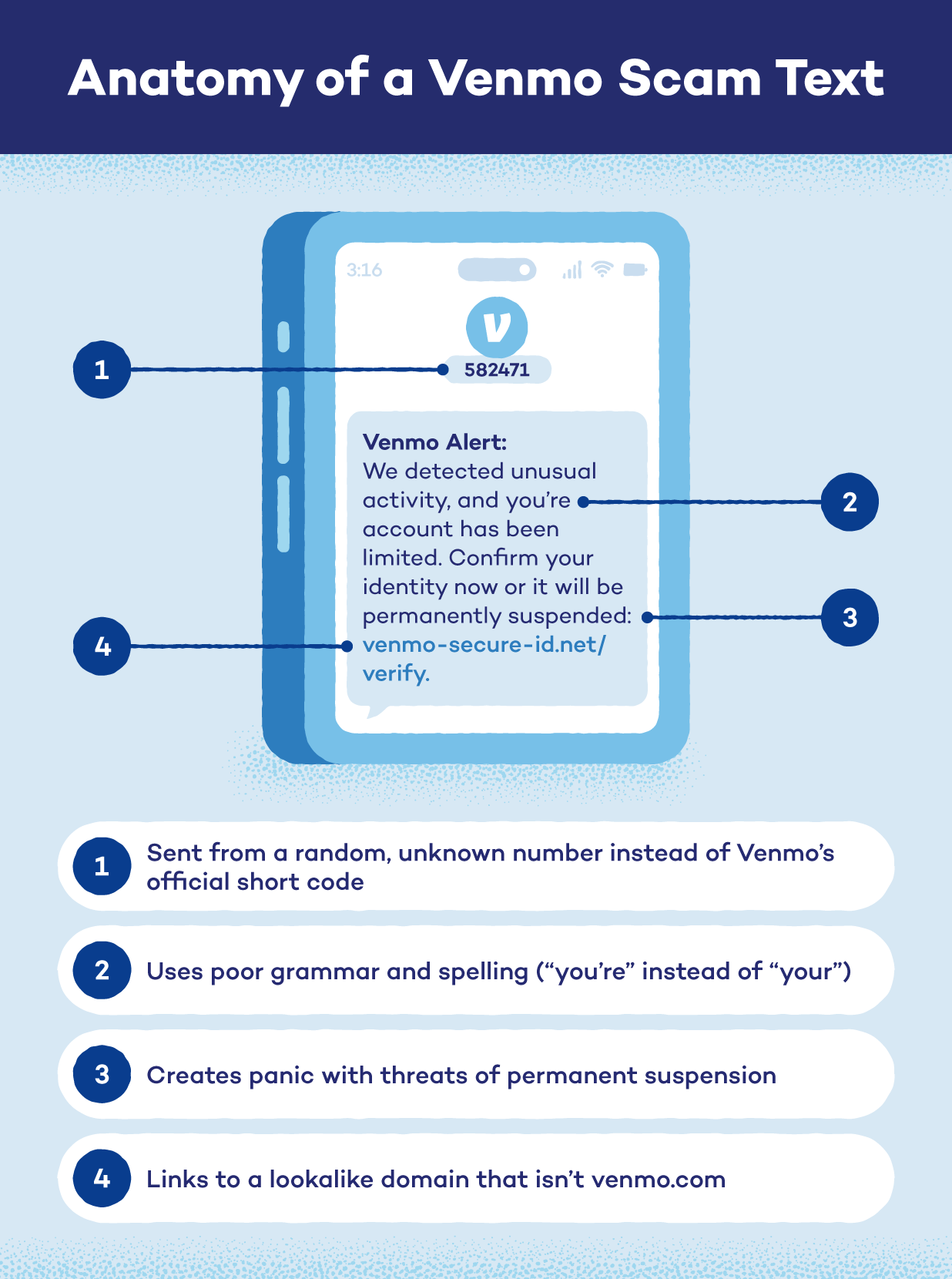
Be cautious if you get an unexpected text claiming to be from Venmo, especially if it includes a link or asks you to take action on your account. Venmo recommends looking for a few specific red flags like generic greetings, suspicious links, requests for personal information, or pressure to act immediately.
If you think you’ve received a fake Venmo text, take a screenshot that includes the sender’s full phone number and forward it to [email protected] as an attachment, then delete the message.
How to Protect Your Venmo Account
A few simple settings and habits can make it much harder for scammers to access your account or trick you into sending money.
Verify before you send
Before you send money, make sure you know who you’re paying and that the request is really from them. If you get an unexpected request from someone you know, check with them through a separate channel, like a text or phone call.
It only takes a minute and can save you from sending money to a scammer. Venmo payments can be difficult to recover, so it’s always better to check first. You can also set your transaction privacy to private or friends only. This limits who can see who you’re paying or receiving money from.
Lock down your account
Turn on multi-factor authentication (MFA) to give your account another layer of protection. If someone gets your password, they’ll still need the additional verification to sign in. Keep your password and one-time verification codes private, too. Venmo won’t ask you to share them with their support staff.
You can also use a password manager to generate and store unique passwords for your Venmo account. Some brands also provide family password managers so all members are covered.
What to Do If You’ve Already Been Scammed on Venmo
Like with other cybercrimes, you need to act quickly with a Venmo scam to limit the damage. That’s especially important if the scammer has access to your account or linked payment information.
Here’s what to do if you’ve been scammed:
- Don’t send the scammer more money or give them any additional information. Even better, block the account and stop responding to their messages.
- Contact Venmo support via the app or their Contact Us page and tell them what happened and provide the transaction details.
- Notify your bank or card issuer linked to your account, particularly if you see an unauthorized transaction or think the scammer may have accessed your financial information.
- Change your Venmo password and enable MFA if you shared your login details or entered them on a suspicious website. This will prevent the scammer from using your leaked credentials to access your account.
- File a report at ReportFraud.ftc.gov and include details about the scam and any money you lost. This helps the FTC track fraud and identify patterns that could help protect others.
Stay Ahead of Venmo Scams With Panda Security
Venmo scams can happen in several ways, but they usually rely on getting you to trust the wrong person at the wrong time. Knowing the warning signs can help you spot a scam before you send money or hand over your account details.
In addition to knowing what to look for and staying alert, you should secure the devices you use to manage your money and accounts. Panda Dome Complete combines antivirus, password management, file encryption, and other security tools to help keep your devices, accounts, and personal information safe.
Protect your devices and accounts from the threats that could put your personal information at risk with Panda Dome Complete.
FAQ
Can Someone Steal Your Bank Info From Venmo?
While other Venmo users can’t see your full bank information, scammers may be able to access it if they take over your account or trick you into sharing sensitive details. For example, they can use phishing messages or pose as Venmo support to steal financial information or your login details.
How Can You Tell If Someone Is Scamming You on Venmo?
Someone might be scamming you on Venmo if a payment or request seems unusual or if someone is pressuring you to act quickly. Always take a moment to verify who you’re dealing with and check the request through Venmo before sending money or sharing any account information.
Is It Safe to Receive Venmo Payments From Strangers?
It’s safer to avoid accepting Venmo payments from people you don’t know. An unexpected payment could be part of a scam, especially if the sender asks you to send the money back or transfer it elsewhere.
The post 9 Venmo Scams to Watch for and How to Avoid Them appeared first on Panda Security Mediacenter.
Article Link: 9 Venmo Scams to Watch for and How to Avoid Them [2026]